
Customize Email Notifications for Leads, Views, and Sales
Set up and customize FlipLink email notifications for leads, sales, and views — configure triggers, recipients, and frequency so you never miss key activity.

Published on February 9, 2026 · 7 min read
You just published a flipbook. Someone opens it, fills out the lead form, and becomes a potential customer. But you don't find out until three days later when you happen to check your dashboard. By then, the moment has passed — and so has the lead.
That's exactly why FlipLink's email notification system exists. It keeps you in the loop the instant something important happens with your publications, so you can respond fast and never let an opportunity slip through the cracks.
Why Real-Time Notifications Matter
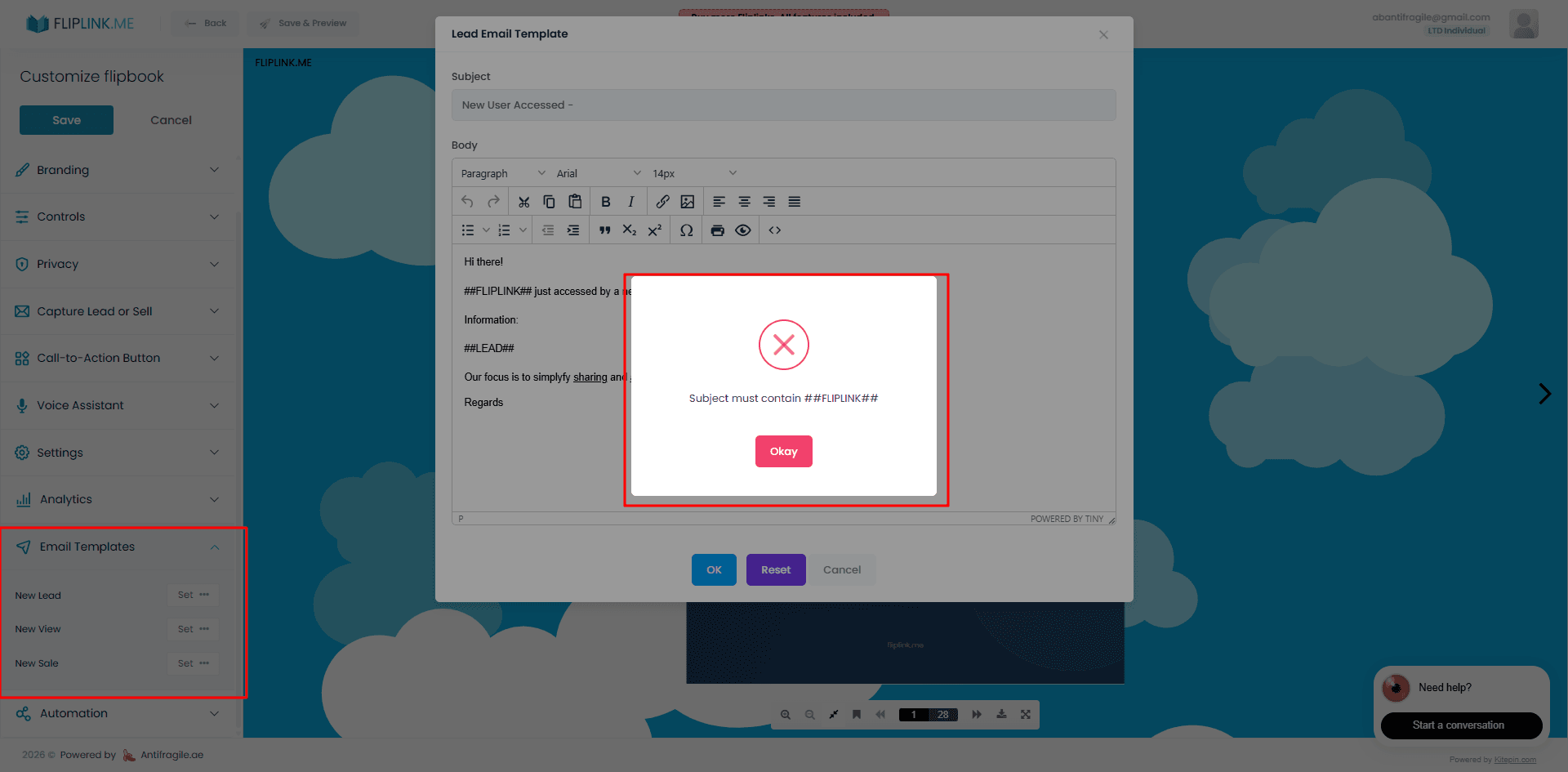
Speed matters in every business interaction. When a prospect downloads your catalog, a reader submits their email through your lead capture form, or a customer completes a purchase on your gated document — those are moments that demand attention.
Real-time email notifications give you three critical advantages:
- Faster follow-up: Reaching out to a lead within minutes dramatically increases conversion rates compared to waiting hours or days.
- Better customer experience: When someone buys a document through your sales-enabled publication, a quick thank-you or onboarding email shows professionalism.
- Operational awareness: Knowing exactly when and how often your publications are being viewed helps you measure campaign performance without constantly refreshing your dashboard.
FlipLink sends notifications automatically, but the real power comes from customizing them to fit your workflow.
Types of Notifications FlipLink Sends
FlipLink's notification system covers every meaningful event across your publications. Here's what you can be alerted about:
Lead Captured
Whenever a reader fills out the lead capture form on your flipbook or document, you receive an email with their details — name, email address, and any custom fields you've configured. This is especially useful if you're using flipbooks for marketing campaigns or gated content strategies. Learn more about setting up lead forms in our guide on how to capture leads with a flipbook.
Document Viewed
Get notified when someone opens your publication. This is particularly valuable for sales teams sending proposals or quotes — you'll know the exact moment a prospect engages with your material.
Sale Completed
If you're selling documents through FlipLink with Stripe integration, you'll receive an alert each time a purchase goes through. The notification includes the buyer's information and the transaction details.
Document Approved
For teams using the document approval workflow, notifications fire when an approver signs off on a publication. This keeps your review process moving without manual check-ins.
How to Customize Notification Templates
FlipLink doesn't just send generic alerts. You can tailor the look, content, and tone of every notification email using the email templates feature.
Here's how to set up your custom templates:
Step 1: Open Email Template Settings
From your FlipLink dashboard, navigate to the publication you want to configure. Open the settings panel and find the Email Templates section.
Step 2: Choose the Notification Type
Select which notification you want to customize — lead captured, document viewed, sale completed, or document approved. Each has its own template.
Step 3: Edit the Template Content
Use the template editor to modify the subject line, body text, and layout. You can add your brand colors, logo, and personalized messaging. The editor supports dynamic variables (covered below) so each email feels personal and relevant.
Step 4: Preview and Save
Always preview your template before saving. Send a test email to yourself to make sure the formatting, variables, and links all render correctly.
Setting Up Notification Preferences
Not every event needs your immediate attention. FlipLink lets you fine-tune which notifications you receive and how they're delivered.
In your notification preferences, you can:
- Toggle individual event types on or off. Want lead alerts but not view notifications? Done.
- Set per-publication preferences. Your high-priority sales proposal might need view alerts, while your public brochure doesn't.
- Choose notification frequency. Get instant alerts for time-sensitive events or batch them into a daily digest for less urgent publications.
- Add multiple recipients. Route lead notifications to your sales team and sale notifications to your finance team — all automatically.
This flexibility means you stay informed without being overwhelmed. Configure once, and let the system work for you.
Try FlipLink Free
Convert your PDF in seconds. No sign-up, no credit card — just upload and go.
Drop your PDF here or click to browse
Max 40MB
Paid plans from $39 raise this to 150 MB.
Email Template Variables
Dynamic variables are what make FlipLink's notification templates truly powerful. Instead of sending the same static email every time, variables pull in real data from each event.
Here are the most commonly used template variables:
- Reader name — The name submitted through the lead form or sale checkout.
- Reader email — The email address of the person who triggered the event.
- Publication title — The name of the flipbook or document that was viewed, purchased, or generated the lead.
- Event timestamp — When the event occurred, formatted for your timezone.
- Publication URL — A direct link back to the publication in question.
- Custom field values — Any additional fields you've added to your lead capture form (company name, phone number, etc.).
- Transaction amount — For sale notifications, the purchase price and currency.
Using these variables, a lead notification could read something like: “New lead from Jane Smith (jane@example.com) on your publication ‘Product Catalog’ at 2:34 PM.” That's immediately actionable without even opening your dashboard.
Notification Types at a Glance
Here's a quick reference table showing each notification type, what triggers it, and the key data included:
| Notification Type | Trigger Event | Key Data Included | Best For |
|---|---|---|---|
| Lead Captured | Reader submits lead form | Name, email, custom fields, publication title | Marketing teams, lead gen campaigns |
| Document Viewed | Reader opens a publication | Viewer info (if available), publication title, timestamp | Sales teams sending proposals |
| Sale Completed | Reader purchases a gated document | Buyer name, email, amount, publication title | Creators selling digital content |
| Document Approved | Approver signs off on publication | Approver name, publication title, timestamp | Teams with review workflows |
Each of these can be independently enabled, disabled, and customized with its own email template.
Tips for Getting the Most Out of Notifications
Once your notifications are configured, here are a few ways to maximize their value:
Connect notifications to your workflow tools. Use the lead and sale data in your notifications to update your CRM, spreadsheet, or project management tool. If you've set up automation with Google Sheets or webhooks, new leads flow directly into your existing systems.
Keep templates concise. Your notification emails should deliver the key information in the first two lines. Save the details for your dashboard — the notification's job is to alert you, not replace your analytics.
Review notification performance periodically. If you're getting dozens of view notifications daily but rarely acting on them, switch to a daily digest or turn them off entirely. Keep only the alerts that drive action.
Use different templates for different publications. A lead notification from your pricing guide should feel different from one generated by your free ebook. Customize the messaging to match the context and the follow-up action you plan to take.
Get Started with Smart Notifications
FlipLink's email notification system makes sure you're always the first to know when something meaningful happens with your publications. Whether it's a hot lead, a new sale, or a key stakeholder viewing your proposal — you'll have the information you need to act fast.
Ready to set up notifications that actually work for your workflow? Create your free FlipLink account and start customizing your email templates today. Already have an account? Check out our pricing page to see how the Lifetime Deal gives you access to the full notification system — including custom email templates — for a one-time payment.
Ready to Create Your First Flipbook?
Transform your PDFs into interactive flipbooks and documents. Get started with FlipLink's Lifetime Deal — lifetime access that starts at just $39.
Pay Once, Use Forever
10, 50 or 100 flipbooks · All 35 features · Unlimited domains
No feature gates. Every Lifetime Deal tier unlocks all 35 features.
- Every feature unlocked — no feature gates
- Stackable — buy more codes anytime
- Replaceable — swap old for new
- Unlimited custom domains (CNAME)
- No recurring fees, ever
Related Reading
Set Up Document Approval Workflows with Email Notifications
Create a simple approval workflow for your documents — reviewers get notified and can approve or reject with one click.