
Lead Capture to Email Nurture Pipeline
Connect your flipbook lead capture to email marketing tools. Build an automated pipeline from lead form to nurture sequence.

Published on March 12, 2026 · 7 min read
Collecting leads from your flipbook is only the beginning. The real value comes from what happens next — routing those leads into an email nurture sequence that builds trust, delivers value, and drives conversions on autopilot. In this guide, you'll learn how to build a complete pipeline from FlipLink's lead capture form all the way through to an automated email nurture sequence using tools you probably already have.
Why a Lead-to-Nurture Pipeline Matters
Most businesses lose potential customers between the moment someone fills out a form and the moment a salesperson follows up. Studies consistently show that responding within the first few minutes dramatically increases conversion rates. An automated pipeline eliminates that gap entirely.
With FlipLink, you can gate your flipbook behind a lead capture form, then automatically push every new lead into your email marketing platform — triggering a welcome sequence within seconds of signup. No manual CSV exports, no copy-pasting between tools, and no leads slipping through the cracks.
Step 1: Configure Your Lead Capture Form
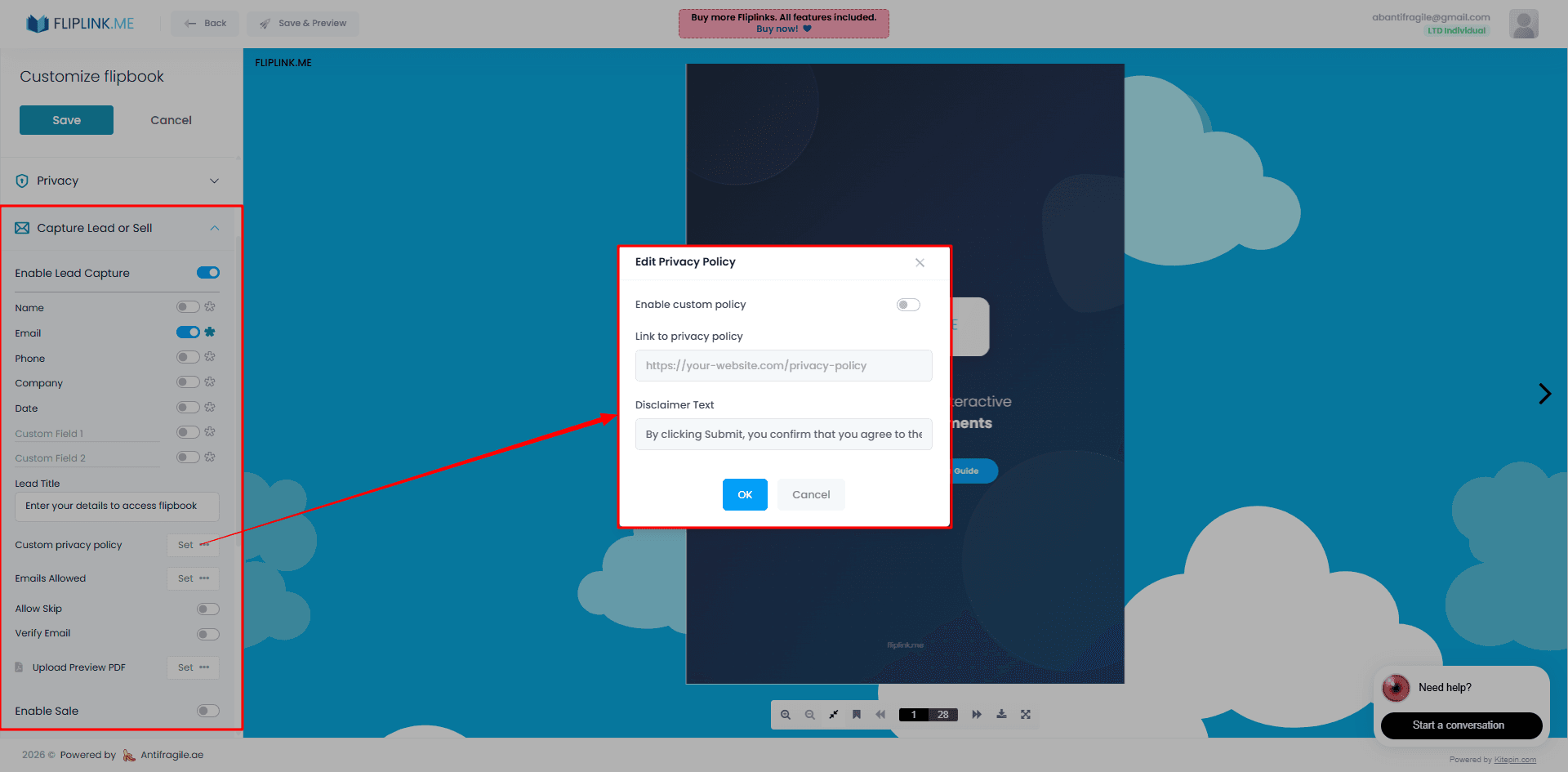
Start by enabling lead capture on your flipbook. Inside the FlipLink dashboard at go.fliplink.me, open your flipbook settings and navigate to the lead capture section.
You can customize which fields appear on the form:
- Name — helps personalize your email sequences
- Email — required for any email nurture workflow
- Phone — optional, useful if your sales team follows up by phone
- Company — helpful for B2B lead scoring
- Custom fields — add any additional qualifying questions
Keep the form short. For a top-of-funnel flipbook like a product catalog or industry report, name and email are usually sufficient. The fewer fields you require, the higher your conversion rate will be.
For a deeper walkthrough, see our guide on how to capture leads with your flipbook.
Step 2: Connect to Google Sheets via Webhook
FlipLink's automation integrations let you send lead data to a webhook URL every time someone submits the capture form. Google Sheets is the simplest starting point because it gives you a live, searchable database of every lead.
Here's the process:
- Create a new Google Sheet with column headers matching your form fields (Name, Email, Phone, etc.)
- Use a middleware tool like Zapier, Pabbly Connect, or Make to create a webhook that appends rows to your sheet
- Copy the webhook URL into your FlipLink lead capture settings
- Test by submitting a sample entry on your flipbook
Every new lead now appears in your Google Sheet automatically. This sheet serves double duty — it's both a backup database and a trigger point for additional automations.
Need step-by-step instructions? Check out how to sync flipbook leads to Google Sheets.
Step 3: Route Leads to Your Email Marketing Tool
The Google Sheet connection is useful on its own, but the real power comes from routing leads directly into your email platform. FlipLink's webhook works with any automation tool that accepts incoming webhooks, including:
- Zapier — the most popular option with 5,000+ app integrations
- Pabbly Connect — a cost-effective alternative with lifetime deal pricing
- Make (formerly Integromat) — great for complex multi-step workflows
Setting Up the Automation
The pattern is the same regardless of which tool you choose:
- Trigger: New webhook received from FlipLink (fires when a lead submits the form)
- Action 1 (optional): Add a row to Google Sheets for record-keeping
- Action 2: Add or update a subscriber in your email tool
- Action 3: Apply a tag or add to a specific list based on which flipbook they viewed
Connecting to Popular Email Platforms
Mailchimp: Use the "Add/Update Subscriber" action. Map the email field, set the list, and apply a tag like "flipbook-lead" to segment these contacts.
ConvertKit (Kit): Use the "Add Subscriber to Form" or "Add Tag" action. Tags are the primary way ConvertKit organizes subscribers, so create a tag for each flipbook or content type.
ActiveCampaign: Use the "Create/Update Contact" action and add them to an automation. ActiveCampaign's automation builder is particularly powerful for multi-step nurture sequences.
Brevo (formerly Sendinblue): Use the "Create/Update Contact" action and assign them to a list that triggers your welcome automation.
For a detailed setup guide, see how to connect FlipLink to Zapier, Pabbly, and Make.
Try FlipLink Free
Convert your PDF in seconds. No sign-up, no credit card — just upload and go.
Drop your PDF here or click to browse
Max 40MB
Paid plans from $39 raise this to 150 MB.
Step 4: Design Your Nurture Sequence
Now that leads flow automatically into your email platform, you need a sequence ready to greet them. A good nurture sequence builds trust progressively and leads toward a clear next step.
The Five-Email Framework
Email 1 — Immediate welcome (sent within minutes): Thank them for viewing your flipbook. Deliver any promised resource. Set expectations for what's coming next.
Email 2 — Value delivery (Day 2): Share a related piece of content — a blog post, case study, or video. Link back to another flipbook if you have one.
Email 3 — Social proof (Day 4): Include a customer testimonial, case study results, or usage statistics. Real numbers build credibility.
Email 4 — Address objections (Day 7): Tackle the most common reasons people hesitate. FAQ-style content works well here.
Email 5 — Call to action (Day 10): Make a direct offer — a demo, consultation, discount, or next step. Include a deadline or limited availability if appropriate.
Segmentation Tips
Not all flipbook leads are the same. Use tags or custom fields to segment your nurture sequences:
- By flipbook topic — someone who viewed your pricing catalog gets a different sequence than someone who read your industry report
- By engagement level — leads who spent more time on your flipbook may be warmer and ready for a faster sales path
- By form data — if you collected company size or role, tailor messaging accordingly
Step 5: Track Engagement with FlipLink Analytics
FlipLink's analytics and insights dashboard shows you exactly how leads interact with your flipbooks — which pages they viewed, how long they spent reading, and whether they returned for multiple sessions.
Cross-reference this data with your email engagement metrics to build a complete picture:
- High flipbook engagement + high email opens = hot lead, prioritize for sales outreach
- High flipbook engagement + low email opens = check your email deliverability or subject lines
- Low flipbook engagement + high email opens = the content may not match their expectations
- Low on both = consider whether your targeting is reaching the right audience
Use FlipLink's lead management features to review individual lead profiles and see their full engagement history in one place.
Common Mistakes to Avoid
Waiting too long to follow up. Your first email should arrive within minutes, not hours. Automation handles this automatically, but only if your pipeline is properly connected before you start driving traffic.
Asking for too much information upfront. Every additional form field reduces conversion rates. Collect the minimum you need to start the conversation, then gather more details through your email sequence.
Sending generic sequences to everyone. A one-size-fits-all approach wastes the context you already have. Use the flipbook topic and engagement data to personalize at minimum.
Forgetting to test the full pipeline. Before launching, submit a test lead through your flipbook and verify it arrives in your email tool with the correct tags and triggers the right sequence.
Putting It All Together
Here's the complete pipeline at a glance:
- Visitor lands on your flipbook
- Lead capture form collects name and email
- Webhook fires to your automation tool (Zapier, Pabbly, or Make)
- Automation adds the lead to Google Sheets and your email platform
- Email nurture sequence begins automatically
- You monitor engagement through FlipLink analytics and email metrics
- Warm leads get flagged for personal outreach
The entire flow runs without manual intervention once configured. You publish a flipbook, share the link, and every lead enters a structured path toward conversion.
Start Building Your Pipeline Today
FlipLink gives you everything you need to capture leads from interactive flipbooks and connect them to your existing marketing stack. Whether you're using Mailchimp, ConvertKit, ActiveCampaign, or any other platform, the webhook-based integration makes it straightforward to automate your entire lead-to-nurture workflow.
Create your free FlipLink account and start building your pipeline. Check out our pricing page for details on available plans.
Ready to Create Your First Flipbook?
Transform your PDFs into interactive flipbooks and documents. Get started with FlipLink's Lifetime Deal — lifetime access that starts at just $39.
Pay Once, Use Forever
10, 50 or 100 flipbooks · All 35 features · Unlimited domains
No feature gates. Every Lifetime Deal tier unlocks all 35 features.
- Every feature unlocked — no feature gates
- Stackable — buy more codes anytime
- Replaceable — swap old for new
- Unlimited custom domains (CNAME)
- No recurring fees, ever
Related Reading
How to Create a Lead Magnet: A Step-by-Step Guide
A practical step-by-step guide to creating a lead magnet that converts — pick the topic, build the asset, gate it behind an email form, and capture every lead.
What Is a Lead Magnet? Definition, Types & Examples
Learn what a lead magnet is, why it works, the types that convert best, and how to gate one behind an email form so every download becomes a qualified lead.
Connect FlipLink to Zapier, Pabbly & Make
Automate your flipbook lead workflow by connecting FlipLink to Zapier, Pabbly, or Make via webhooks.