
How to Set Up a Flipbook Storefront to Sell Digital Content
Create a digital storefront for your flipbooks and documents. Learn how to sell PDFs online with Stripe integration and custom domains.

Published on February 21, 2026 · 7 min read
Selling digital content has never been more accessible. Whether you're a publisher, educator, consultant, or independent creator, turning your PDFs into a revenue stream is one of the smartest moves you can make. With FlipLink, you can transform static documents into interactive flipbooks — and sell them directly through your own branded storefront.
This guide walks you through every step of setting up a flipbook storefront, from connecting Stripe to customizing your buyer experience.
Why Sell Digital Content as Flipbooks?
Traditional PDF downloads feel flat. Buyers click a link, grab a file, and the experience ends. Flipbooks change that entirely. Your content gets a 3D page-turning experience that feels premium, keeps readers engaged longer, and justifies a price tag.
Here's what makes flipbook storefronts compelling:
- No inventory or shipping — deliver instantly after payment
- Zero marginal cost — sell the same flipbook to unlimited buyers
- Premium presentation — 3D page-flip makes content feel worth paying for
- Built-in analytics — track who bought, what they read, and how long they stayed
- Full brand control — your domain, your colors, your logo
What You Can Sell
Almost any digital content works as a paid flipbook. The most popular categories include:
- Ebooks and guides — self-published books, how-to manuals, recipe collections
- Online courses and workbooks — training materials with interactive page navigation
- Industry reports — market research, whitepapers, annual reports
- Templates and toolkits — design templates, business plan kits, worksheet bundles
- Magazines and catalogs — digital editions sold per issue or as subscriptions
- Photography portfolios — high-resolution image collections with page-flip presentation
If it starts as a PDF, it can become a sellable flipbook.
Prerequisites Before You Start
Before enabling sales on your flipbook, you need two things in place:
1. A Custom Domain (CNAME)
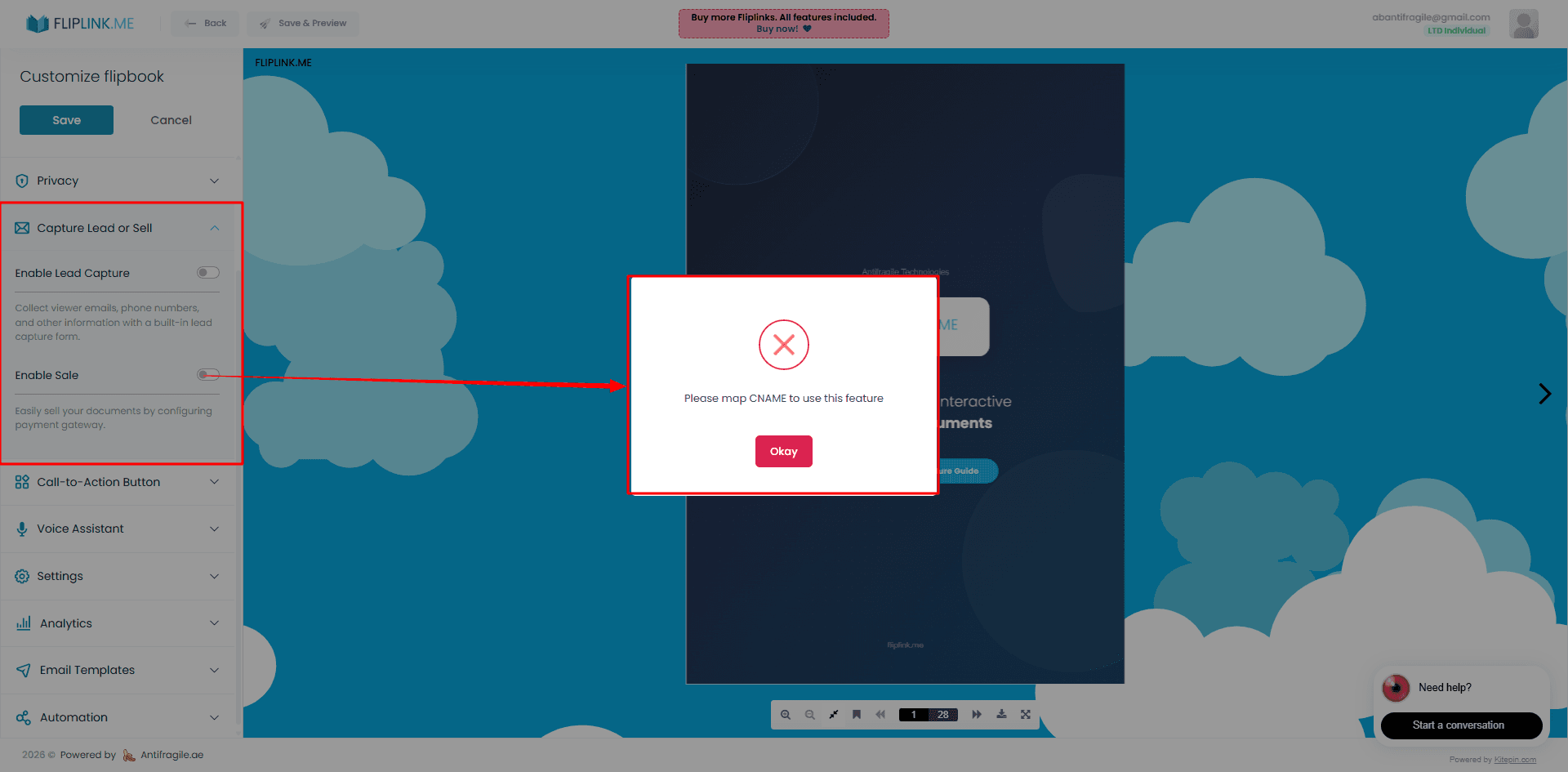
Sale mode in FlipLink requires a custom domain. This means your flipbook storefront lives on your own URL — something like shop.yourdomain.com instead of a generic subdomain. You'll need access to your domain's DNS settings to add a CNAME record pointing to FlipLink.
Why the requirement? Payment pages need to feel trustworthy. Buyers are far more likely to complete a purchase when the checkout happens on a branded domain they recognize.
2. A Stripe Account
FlipLink uses Stripe integration for all payment processing. If you don't already have a Stripe account, you can create one for free at stripe.com. Stripe handles credit card processing, invoicing, payouts, and tax compliance in over 40 countries.
Important note: Sale mode and Lead Capture mode are mutually exclusive on any given flipbook. You can either gate content behind a payment wall or behind a lead capture form — not both simultaneously. Choose the monetization strategy that fits each piece of content.
Step-by-Step Setup
Step 1: Upload Your PDF and Create the Flipbook
Log in to go.fliplink.me and upload your PDF. Choose the flipbook format for the 3D page-turning experience, or the document format for a scrollable reader. Once uploaded, preview it to make sure everything looks right — page order, image quality, and text rendering.
Step 2: Connect Your Stripe Account
Navigate to your flipbook's settings and find the sales section. Click the Stripe connect button to link your account. FlipLink uses Stripe Connect, which means payments go directly to your Stripe account. You maintain full control over your revenue, refund policies, and payout schedule.
Step 3: Set Up Your Custom Domain
Add a CNAME record in your domain's DNS settings. This typically looks like:
| Record Type | Host | Value |
|---|---|---|
| CNAME | shop | your-fliplink-cname-target |
DNS propagation usually takes a few minutes, though it can occasionally take up to 24 hours. Once verified, your flipbook storefront will be accessible on your custom domain. There's no limit on how many custom domains you can add to your account.
Step 4: Set Your Price
Choose a price point for your flipbook. Consider these pricing strategies:
- Value-based pricing — price based on the transformation your content delivers, not page count
- Market comparison — check what competing digital content sells for in your niche
- Tiered offerings — create multiple flipbooks at different price points (starter guide vs. complete toolkit)
- Launch pricing — start lower to build reviews and social proof, then increase
Step 5: Customize Your Storefront Branding
First impressions matter, especially when asking someone to enter payment details. Use FlipLink's branding and design options to make your storefront look professional:
- Upload your logo
- Set brand colors that match your website
- Customize the viewer background
- Add a professional cover page that serves as your product's sales image
A cohesive brand experience between your marketing site and your flipbook storefront builds the trust needed to convert browsers into buyers.
Step 6: Publish and Share
Once everything is configured, publish your flipbook. Share the link on your website, social media, email newsletters, or anywhere your audience lives. Because it's on your custom domain, the URL looks clean and professional.
Free: Pdf To Flipbook
Turn your PDF into a beautiful 3D page-flipping flipbook.
Try it free — no sign-up neededThe Buyer Experience
Understanding what your customers see helps you optimize the flow:
- Buyer visits your flipbook URL on your custom domain
- They see a preview — you control how many pages are visible before the paywall
- Stripe checkout appears — secure, familiar payment form
- After payment, the full flipbook unlocks immediately
- Buyer reads the complete interactive flipbook with 3D page-turning
The entire process is seamless. No account creation required from the buyer, no file downloads to manage, and no access codes to distribute. Pay and read — that's it.
Tracking Sales and Revenue
Once sales start coming in, you'll want visibility into performance. FlipLink's analytics and insights dashboard shows you:
- Total revenue and transaction count
- Individual buyer activity — who purchased and when
- Reading engagement — which pages get the most attention
- Conversion rates — how many visitors become paying customers
Combine this with Stripe's own reporting dashboard for detailed financial data including payouts, refunds, and tax summaries. Together, these tools give you a complete picture of your digital content business.
Tips for Maximizing Storefront Revenue
Create a content ladder. Start with a free or low-cost flipbook to build your audience, then upsell premium content. A free industry overview can lead to a paid deep-dive report.
Use analytics to improve. If readers consistently drop off at a certain page, that section needs work. If a particular flipbook converts well, create more content in that format and topic.
Update regularly. Unlike printed books, flipbooks can be updated anytime. Keep your content current and buyers will come back for future releases.
Cross-promote. Link between your flipbooks. Add a page at the end of each flipbook promoting your other paid content.
Leverage your custom domain. A branded storefront URL is a marketing asset. Use it consistently across all channels so buyers remember where to find your content.
Common Questions
Can I sell documents (scrollable format) too? Yes. Sale mode works with both flipbooks and documents. Choose whichever format suits your content best.
What currencies does Stripe support? Stripe supports over 135 currencies. Your buyers can pay in their local currency based on your Stripe configuration.
Do buyers need to create an account? No. The purchase flow is frictionless — buyers pay via Stripe and get immediate access without registration.
Can I offer free flipbooks alongside paid ones? Absolutely. Each flipbook has its own settings. You can mix free, lead-gated, and paid content across your account.
Start Selling Your Digital Content
Setting up a flipbook storefront takes less than an hour. Connect Stripe, configure your custom domain, set a price, and you're live. No marketplace fees beyond Stripe's standard processing rate, no middlemen, and no limits on what you can earn.
If you're ready to turn your PDFs into a revenue stream, create your free FlipLink account and start building your storefront today. Check out our pricing page to see what's included.
Related reading:
Ready to Create Your First Flipbook?
Transform your PDFs into interactive flipbooks and documents. Get started with FlipLink's Lifetime Deal — lifetime access that starts at just $39.
Pay Once, Use Forever
10, 50 or 100 flipbooks · All 35 features · Unlimited domains
No feature gates. Every Lifetime Deal tier unlocks all 35 features.
- Every feature unlocked — no feature gates
- Stackable — buy more codes anytime
- Replaceable — swap old for new
- Unlimited custom domains (CNAME)
- No recurring fees, ever
Related Reading
How to Set Up a Paywall for Your Digital Publication
Monetize your flipbooks and documents with a Stripe-powered paywall — accept payments in 130+ currencies.
How to Create a Digital Catalog From a PDF
Turn a PDF catalog into a clickable digital catalog with embedded product links, cart-ready buttons, analytics, and embeddable viewer for your website.
Free Online Catalog Maker for E-commerce
Create professional digital product catalogs for your e-commerce business. Step-by-step guide with free tool, design tips, and advanced features.