
Localization
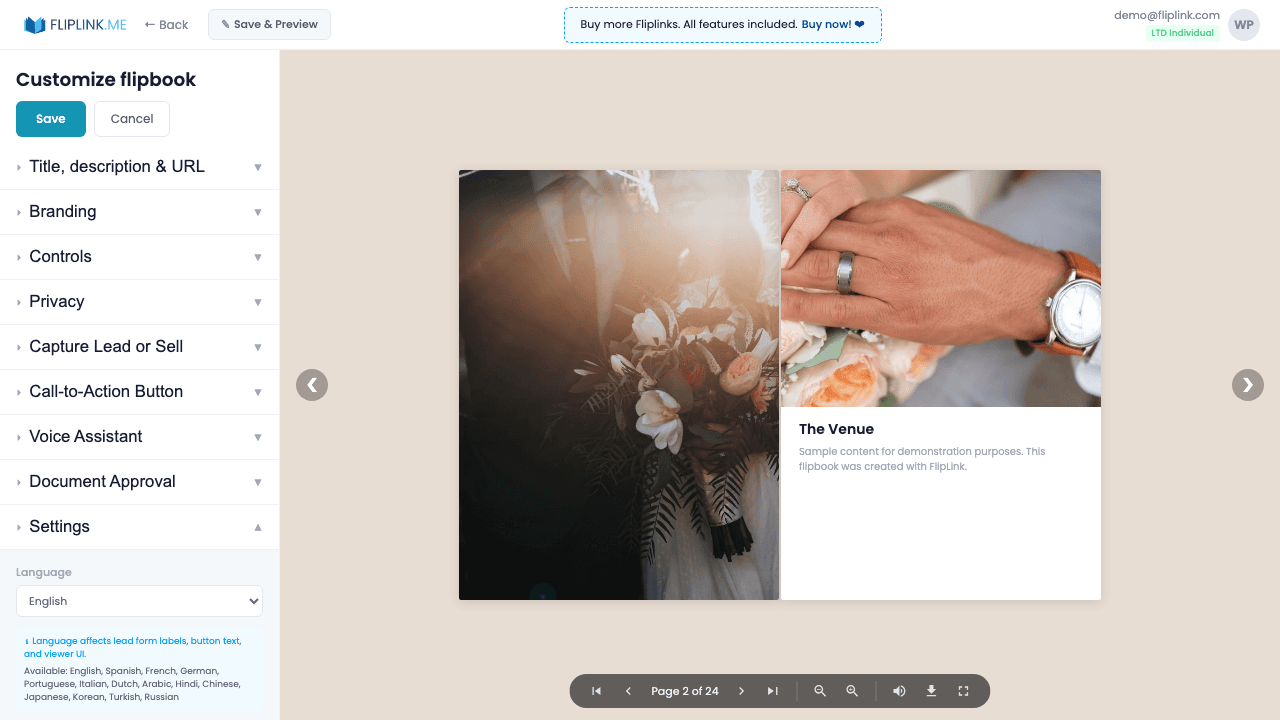
Translate every viewer-facing label into any language your audience speaks — menus, buttons, tooltips, and viewer interface text, all localized.
Overview
Translate every viewer-facing label into any language. Customize password page text, lead form field labels, OTP verification messages, and more. Each publication can have its own language settings, so you can serve audiences in multiple languages from a single account.
What's Included
Password page labels
Translate the password entry page text, placeholder, and button into any language for a localized viewer experience.
Lead form field labels
Customize every label on the lead capture form — name, email, phone, company, submit button — in your audience's language.
OTP verification text
Translate the OTP verification messages, instructions, and button text so email verification feels native to your audience.
Per-publication customization
Each publication can have its own language settings, so you can serve audiences in multiple languages from one account.
Try Localization Free
All features included in the free trial. No credit card required.
Related Features
Create Flipbooks
Turn any PDF into a stunning 3D flipbook with realistic page-flip animations, WebGL rendering, and mobile-ready sharing in seconds.
Create Documents
Share PDFs as scrollable online documents with a clean, professional viewer powered by PDF.js — searchable, responsive, and brandable.
Replace PDF
Update your PDF without losing your link, settings, analytics, or leads. Same URL, new content — perfect for catalogs and proposals.
Use Cases for Localization
Pay Once, Use Forever
10, 50 or 100 flipbooks · All 35 features · Unlimited domains
No feature gates. Every Lifetime Deal tier unlocks all 35 features.
- Every feature unlocked — no feature gates
- Stackable — buy more codes anytime
- Replaceable — swap old for new
- Unlimited custom domains (CNAME)
- No recurring fees, ever
Frequently Asked Questions
Can I change the viewer interface language?
Yes. FlipLink supports multiple interface languages so viewers see navigation and controls in their preferred language.
Does localization affect the document content?
No. Localization changes the viewer interface only. Your PDF content remains in whatever language it was created in.
Ready to Transform
Your PDFs?
Join thousands of businesses using FlipLink to create engaging, interactive content from their PDFs. Start free — no credit card required.