
Optimize Your Flipbook for Social Media with OG Tags
Make your flipbook links look great on social media with custom OG titles, descriptions, and preview images.

Published on February 24, 2026 · 7 min read
You've spent hours crafting a beautiful flipbook — a product catalog, a marketing report, or an interactive brochure. You share the link on LinkedIn, and what shows up? A blank preview card with a generic title. Not exactly the first impression you were going for.
That's where Open Graph (OG) tags come in. They're the hidden layer of metadata that controls how your flipbook link appears when someone shares it on social media. Get them right, and your shared links become eye-catching cards that drive clicks. Ignore them, and you're leaving engagement on the table.
What Are OG Tags and Why Do They Matter?
Open Graph tags are small pieces of metadata embedded in a web page's HTML. When someone pastes your flipbook URL into a social media post, the platform's crawler reads these tags to generate a rich preview card — complete with a title, description, and image.
Without OG tags, platforms fall back to guessing. They might pull a random image from the page, truncate your title awkwardly, or show no preview at all. With properly configured OG tags, you control exactly what people see before they click.
This matters because social media previews are essentially free advertising. A compelling preview card with a clear title, a concise description, and a branded image can dramatically increase your click-through rate compared to a plain text link.
For anyone using flipbooks as part of their marketing reports or sales collateral, optimized social previews are a must.
How FlipLink Auto-Generates OG Tags
When you publish a flipbook or document with FlipLink, the platform automatically generates OG tags based on your publication details. Here's what happens behind the scenes:
- OG Title is pulled from your publication's title
- OG Description uses the description you entered during upload
- OG Image is generated from the first page (cover) of your PDF
This means that even if you do nothing, your shared links will have a reasonable preview. But “reasonable” isn't the same as “optimized.” The auto-generated cover image might not look great as a small social thumbnail, and your PDF title might be something like “Q3-Report-Final-v2” — not exactly click-worthy.
That's why FlipLink gives you full control over every OG field through the SEO and Social Previews settings.
How to Customize Your OG Tags in FlipLink
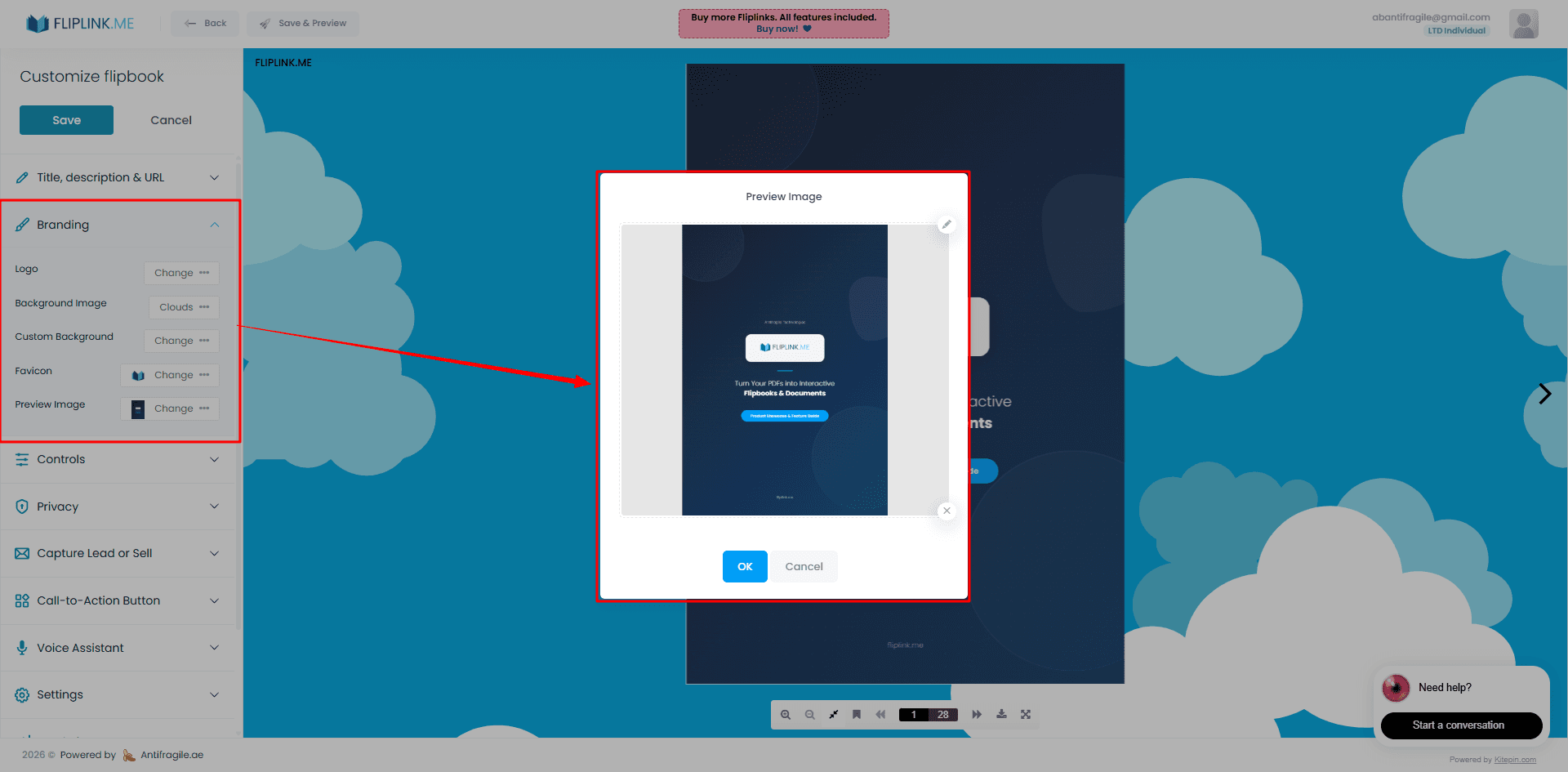
Customizing your social preview takes less than a minute. Inside the FlipLink dashboard, open any publication and navigate to the SEO settings panel. From there, you can edit three key fields:
OG Title
This is the bold headline that appears on preview cards. Keep it under 60 characters so it doesn't get cut off. Use action-oriented language that tells the viewer what they'll get.
Instead of: “Company Product Catalog” Try: “Browse Our Interactive Product Catalog”
OG Description
The description appears below the title and gives context. Aim for 120–155 characters. Think of it as a mini pitch — why should someone click?
Instead of: “A PDF of our products” Try: “Flip through 50+ products with pricing, specs, and 360-degree views. No download needed.”
OG Image
This is the most impactful element. Upload a custom image that's designed specifically for social sharing rather than relying on the auto-generated cover. We'll cover image best practices in detail below.
Once you save your changes, FlipLink updates the OG tags on your publication's share page instantly. No redeploy, no waiting.
Platform-Specific Preview Behavior
Different social platforms render OG tags slightly differently. Understanding these differences helps you optimize for each channel.
Facebook and Instagram
Facebook uses a large rectangular card format. The OG image is displayed prominently, with the title below and the description in smaller text. Facebook caches previews aggressively — if you update your OG tags, you may need to use Facebook's Sharing Debugger tool to force a refresh.
LinkedIn displays a similar card format but tends to show more of the description text. Since LinkedIn is a professional network, your OG description should emphasize business value. Flipbooks shared on LinkedIn — like case studies, whitepapers, and proposals — benefit from descriptions that highlight data points or outcomes.
X (Twitter)
X uses its own twitter:card meta tags, but falls back to OG tags when Twitter-specific tags aren't present. FlipLink handles both, so your previews look great on X without extra configuration. Use the “summary_large_image” format for maximum visual impact.
WhatsApp and Messaging Apps
WhatsApp generates previews from OG tags when a link is shared in a chat. The image appears as a small thumbnail alongside the title and description. Because the image is smaller here, make sure any text on your OG image is large enough to read at thumbnail size.
Free: Pdf To Flipbook
Turn your PDF into a beautiful 3D page-flipping flipbook.
Try it free — no sign-up neededBest Practices for OG Images
Your OG image is the single biggest factor in whether someone clicks your shared link. Here's how to make it count:
Recommended Dimensions
Use 1200 x 630 pixels for the best results across platforms. This is the standard OG image size and renders well on Facebook, LinkedIn, X, and messaging apps. Keep your file size under 1 MB for fast loading.
Design Tips
- Include your brand logo in a corner for recognition
- Use bold, readable text — a short headline or value proposition works well
- Choose a clean background that contrasts with the text
- Show a preview of the content — a mockup of the flipbook open to an interesting page can spark curiosity
- Avoid clutter — the image will be displayed small on mobile, so simplicity wins
Your branding and design settings in FlipLink let you maintain a consistent visual identity across all your publications, including social previews.
What to Avoid
- Don't use your PDF cover as-is — it's usually the wrong aspect ratio
- Don't include small text that becomes unreadable at thumbnail size
- Don't leave the image blank or use a generic stock photo
- Don't forget to test your preview before sharing widely
OG Tag Reference Table
Here's a quick reference for all the OG tags FlipLink generates for your publications:
| OG Tag | Purpose | Recommended Length | Example |
|---|---|---|---|
og:title | Headline on preview card | Under 60 characters | “Interactive Product Catalog” |
og:description | Supporting text below title | 120–155 characters | “Browse 50+ products with specs and pricing” |
og:image | Preview image | 1200 x 630 px | Custom branded image |
og:url | Canonical URL of publication | Full URL | https://go.fliplink.me/abc123 |
og:type | Content type | N/A | website |
og:site_name | Platform name | N/A | FlipLink |
twitter:card | X card format | N/A | summary_large_image |
Sharing Your Optimized Flipbook
Once your OG tags are set, take advantage of FlipLink's sharing and distribution tools to get your flipbook in front of the right audience. You can copy a direct link, embed the flipbook on your website, generate a QR code, or share via email.
For a deeper dive into distribution strategies, check out our guide on ways to share your flipbook online.
Quick Pre-Share Checklist
- Set a custom OG title that's clear and compelling
- Write an OG description that gives a reason to click
- Upload a custom OG image at 1200 x 630 pixels
- Test the preview using platform debugger tools (Facebook Sharing Debugger, LinkedIn Post Inspector, X Card Validator)
- Clear cached previews if you've updated tags on a previously shared link
Start Creating Flipbooks That Look Great Everywhere
Your flipbook deserves to make a strong first impression — not just when someone opens it, but the moment they see it in their social feed. With FlipLink's built-in OG tag customization, you can control exactly how your publications appear on every platform.
Ready to create flipbooks with polished social previews? Sign up for FlipLink and start publishing today. With the lifetime deal at just $39, you get full control over branding, SEO, and social sharing without a monthly subscription.
Check out our pricing page to see what's included.
Ready to Create Your First Flipbook?
Transform your PDFs into interactive flipbooks and documents. Get started with FlipLink's Lifetime Deal — lifetime access that starts at just $39.
Pay Once, Use Forever
10, 50 or 100 flipbooks · All 35 features · Unlimited domains
No feature gates. Every Lifetime Deal tier unlocks all 35 features.
- Every feature unlocked — no feature gates
- Stackable — buy more codes anytime
- Replaceable — swap old for new
- Unlimited custom domains (CNAME)
- No recurring fees, ever
Related Reading
How to Share Flipbooks on Social Media Effectively
Get more eyes on your flipbook by sharing it across Facebook, LinkedIn, Twitter, and other social platforms.
How to Link a PDF in Google Docs
Need to add a PDF link inside a Google Doc? Here's how to hyperlink to a PDF in Google Docs the right way — so the file opens cleanly for every reader.
How to Link a PDF: A Simple Guide
Learn how to link a PDF so anyone can open it in a browser with one click. Compare cloud drives, file hosts, and a permanent FlipLink URL with tracking.