
How to Gate Content with a Lead Form Before Your Flipbook
Require readers to fill out a lead form before accessing your flipbook — capture emails and grow your list.

Published on February 24, 2026 · 8 min read
What Is Gated Content and Why Does It Work?
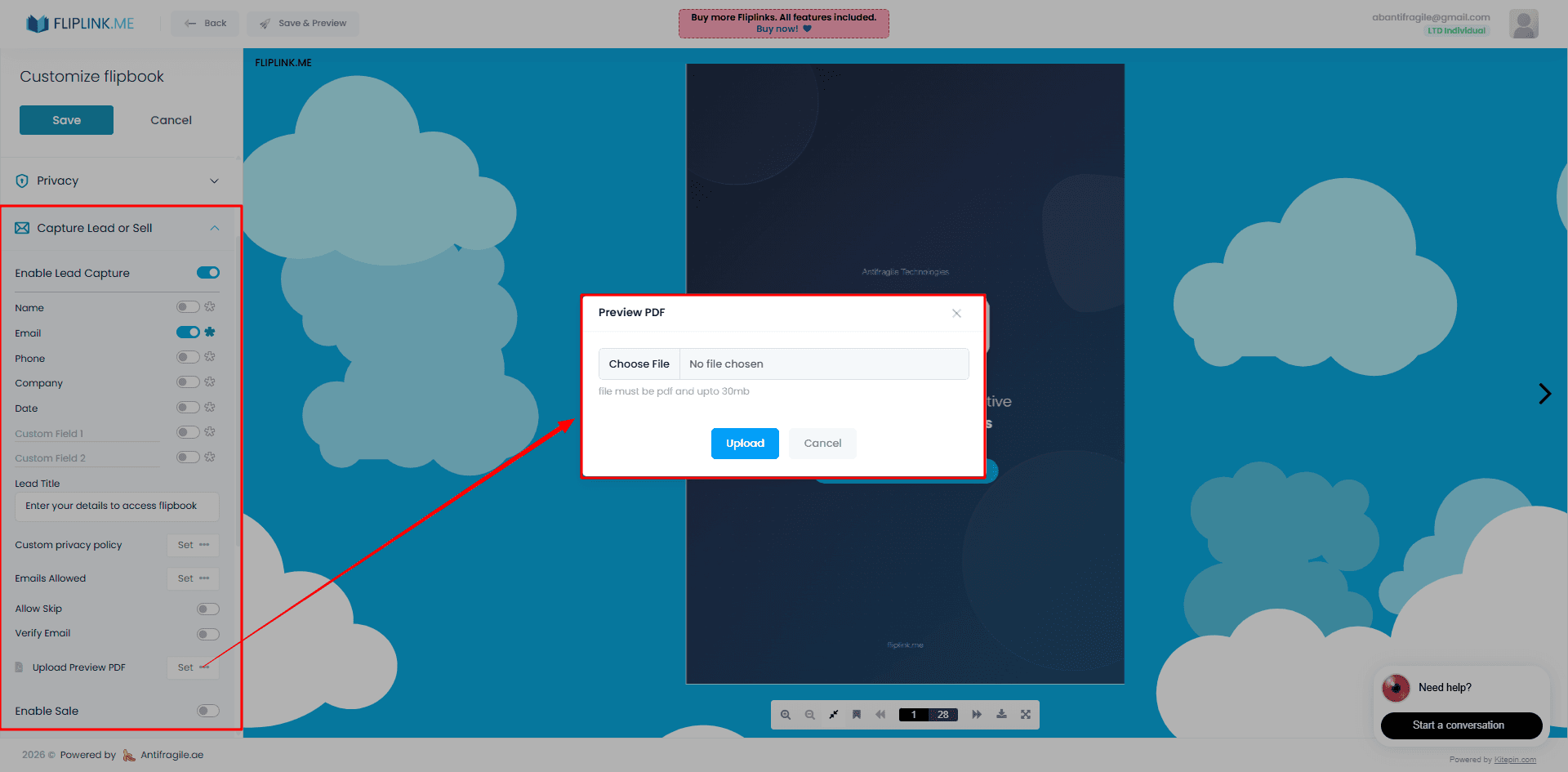
Gated content is any digital asset — an ebook, whitepaper, report, or flipbook — that requires a reader to submit their information before they can access it. Instead of giving everything away for free, you place a simple lead form between your audience and your content.
The logic is straightforward: if your content is valuable enough, people will happily trade their name and email for access. This is the engine behind most B2B content marketing strategies. Gated content consistently outperforms ungated content for lead generation when the content is valuable enough to justify the form.
The challenge has always been the delivery mechanism. PDFs sent via email feel clunky. Landing page builders add complexity. But when your content lives inside an interactive flipbook with realistic 3D page turns, the perceived value skyrockets — and so does the conversion rate on your lead form.
That's exactly what FlipLink's Lead Capture feature is designed to do.
How FlipLink's Lead Gate Works
When you enable Lead Capture on any FlipLink publication, a customizable form appears before your flipbook or document loads. The reader sees the form first, fills it out, and only then gains access to your content.
Here's how the flow works:
- Reader clicks your link — whether it's embedded on your website, shared on social media, or sent in an email
- Lead form appears — a clean, branded overlay asks for their details
- Reader submits the form — their information is captured and stored
- Content unlocks — your flipbook or scrollable document loads instantly
There's no redirect, no separate landing page, and no email delivery delay. Everything happens in one seamless experience. The gate is built right into the viewer, so your content and your lead form live in the same place.
You can enable Lead Capture from your FlipLink dashboard with a single toggle. No code, no third-party integrations, no landing page builders required.
Show Preview Pages to Hook Interest First
One of the most effective gating strategies is giving readers a taste before asking for their information. FlipLink lets you configure preview pages — a set number of pages that load before the lead form appears.
For example, you might show the first three pages of your industry report. The reader flips through the cover, the table of contents, and the executive summary. Just as they're getting invested in the content, the lead form slides in.
This approach works because it:
- Builds curiosity — readers who've already started consuming content are far more likely to complete the form
- Demonstrates value — showing real content proves your flipbook is worth their information
- Reduces bounce rates — compared to a hard gate where the form appears immediately
You control exactly how many pages to show before the gate. For shorter content like brochures, one or two preview pages may be enough. For longer reports or guides, three to five pages tend to hit the sweet spot.
This is especially powerful for marketing reports where your data and insights speak for themselves.
Setting Up Your Lead Form Fields
FlipLink gives you full control over what information you collect. The default form includes name and email fields, but you can customize it to match your needs.
Available field options include:
- Full name — standard for most use cases
- Email address — the most critical field for follow-up
- Phone number — useful for sales-driven content
- Company name — great for B2B lead qualification
- Custom fields — add any field you need, such as job title, industry, or a specific question
Best practices for form design:
- Keep it short. Every additional field reduces conversion rates. For top-of-funnel content, name and email are usually enough.
- Make non-essential fields optional. If you want phone numbers but don't want to scare people off, mark them as optional.
- Match the form to the content value. A quick checklist might only warrant an email. A 50-page industry report can justify asking for more details.
The form styling matches your flipbook's branding automatically, so the experience feels cohesive rather than bolted on.
Free: Pdf To Flipbook
Turn your PDF into a beautiful 3D page-flipping flipbook.
Try it free — no sign-up neededOTP Email Verification for Higher Lead Quality
Fake emails are the bane of gated content. People type test@test.com or random strings just to get past the form. FlipLink solves this with OTP (One-Time Password) email verification.
When enabled, after a reader submits the form, FlipLink sends a verification code to the email they provided. They must enter that code to unlock the content. This ensures:
- Every email is real and deliverable — no more bounced follow-up emails
- Lead quality improves dramatically — you're only collecting verified contacts
- Spam submissions drop to near zero — bots and lazy fake entries are filtered out
Yes, adding a verification step creates a small amount of friction. But for high-value content — think pricing guides, exclusive research, or gated product demos — the trade-off is absolutely worth it. You'd rather have 50 verified leads than 200 junk entries.
You can toggle OTP verification on or off per publication, so you can use it selectively based on the content's value and your campaign goals.
Where Leads Are Stored and How to Export Them
Every lead captured through your gated flipbooks is stored in FlipLink's built-in Lead Management system. You can view, search, and filter your leads directly from the dashboard.
What you can do with your leads:
- View all submissions with timestamps, source publication, and form data
- Filter by publication to see which content generates the most leads
- Export as CSV for import into your CRM, email marketing tool, or spreadsheet
- Sync to Google Sheets automatically for real-time lead tracking (see our guide on how to sync flipbook leads to Google Sheets)
The CSV export includes every field the reader submitted, making it easy to segment and follow up. Whether you use HubSpot, Mailchimp, Salesforce, or a simple spreadsheet, your leads are ready to go.
For a deeper walkthrough on the full lead capture workflow, check out our guide on how to capture leads with a flipbook.
Gated vs. Ungated Content: When to Use Each
Not every piece of content should be gated. Here's a comparison to help you decide:
| Factor | Gated Content | Ungated Content |
|---|---|---|
| Lead generation | High — captures contact info | None — anonymous visitors |
| SEO visibility | Lower — search engines can't index gated content | Higher — fully crawlable |
| Audience reach | Smaller — some visitors won't fill out the form | Larger — no barrier to access |
| Perceived value | Higher — gating signals exclusivity | Lower — free content feels less premium |
| Best for | Ebooks, reports, pricing guides, exclusive research | Blog posts, product overviews, brand awareness content |
| Follow-up potential | Strong — you have their email | Weak — no way to re-engage |
| Conversion tracking | Easy — you know exactly who accessed what | Harder — relies on analytics tools |
The hybrid approach
The smartest strategy is to use both. Publish ungated blog content and product pages to drive organic traffic and build trust. Then gate your highest-value assets — detailed guides, industry reports, templates, and exclusive tools — to convert that traffic into leads.
FlipLink makes this easy because you toggle gating per publication. Your product catalog can be open to everyone while your pricing guide requires a form submission.
Tips for Maximizing Lead Form Conversions
A few practical tips to get the most out of your gated flipbooks:
- Write a compelling headline on the gate. Don't just say "Enter your email." Tell them what they're getting: "Get instant access to the complete industry report."
- Use preview pages strategically. Show enough to create desire, but stop before you give away the main insights.
- Promote on the right channels. Gated content performs best when shared with warm audiences — email subscribers, LinkedIn connections, and retargeted website visitors.
- Follow up quickly. The best time to email a new lead is within minutes of capture, not days later.
- A/B test your form length. Try email-only versus email + name to see which converts better for your audience.
Start Gating Your Content Today
If you're publishing flipbooks or documents without a lead gate, you're leaving leads on the table. FlipLink's Lead Capture feature makes it effortless to turn every publication into a lead generation machine.
With preview pages to hook interest, customizable form fields, OTP verification for lead quality, and built-in lead management with CSV export, you have everything you need — no extra tools required.
Ready to start capturing leads? Create your free FlipLink account and enable Lead Capture on your first publication. Check out our pricing page to see how FlipLink's lifetime deal gives you everything for a one-time payment from $39.
Ready to Create Your First Flipbook?
Transform your PDFs into interactive flipbooks and documents. Get started with FlipLink's Lifetime Deal — lifetime access that starts at just $39.
Pay Once, Use Forever
10, 50 or 100 flipbooks · All 35 features · Unlimited domains
No feature gates. Every Lifetime Deal tier unlocks all 35 features.
- Every feature unlocked — no feature gates
- Stackable — buy more codes anytime
- Replaceable — swap old for new
- Unlimited custom domains (CNAME)
- No recurring fees, ever
Related Reading
Gate Content: Flipbook Lead Capture Guide
Learn how to gate your whitepapers, reports, and guides behind a lead form to turn content into a lead generation machine
15 Lead Magnet Examples & Ideas That Convert in 2026
Browse 15 proven lead magnet examples by goal and industry — checklists, eBooks, templates, catalogs, and more — plus how to gate each one behind an email form.
What Is a Lead Magnet? Definition, Types & Examples
Learn what a lead magnet is, why it works, the types that convert best, and how to gate one behind an email form so every download becomes a qualified lead.