
Gate Content: Flipbook Lead Capture Guide
Learn how to gate your whitepapers, reports, and guides behind a lead form to turn content into a lead generation machine

Published on February 24, 2026 · 9 min read
What Is Gated Content?
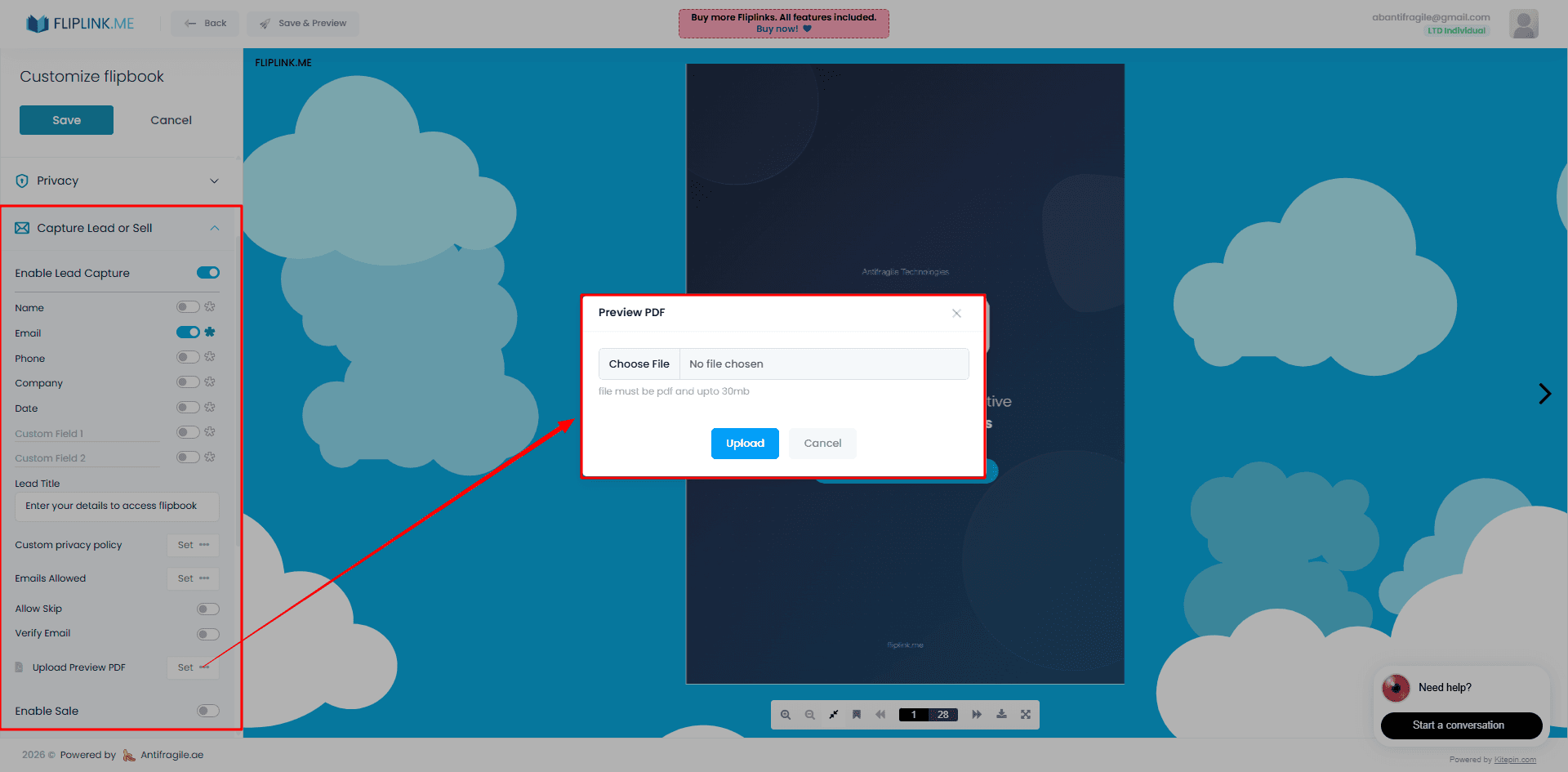
Gated content is any piece of valuable material — a whitepaper, research report, ebook, or industry guide — that requires a visitor to submit their contact information before they can access it. Instead of giving everything away for free, you place a short form in front of the content and collect names, email addresses, job titles, or whatever fields matter to your pipeline.
The concept is straightforward: you trade value for data. The reader gets something genuinely useful, and you get a qualified lead to nurture. When done well, gated content becomes the backbone of a B2B content marketing strategy. When done poorly, it frustrates readers and tanks your reach.
The key is knowing when to gate, what to gate, and how to do it without creating friction that drives people away.
When to Gate and When to Keep Content Open
Not every PDF deserves a form in front of it. Gate the wrong content and you'll see bounce rates climb while leads stay flat. Here's a practical framework for making the call.
Gate your content when:
- It contains original research, proprietary data, or unique insights readers can't find elsewhere
- The piece is long-form and took significant effort to produce (whitepapers, annual reports, detailed playbooks)
- Your primary goal for that asset is lead generation, not brand awareness
- The audience is mid-funnel or bottom-funnel — they already know who you are
Keep content open when:
- The goal is SEO visibility or social sharing
- It's a top-of-funnel awareness piece (blog posts, infographics, short guides)
- You're building trust with a new audience that hasn't heard of your brand yet
- The content is a product overview or comparison — gating these feels aggressive
The best strategy combines both. Use ungated content to attract and educate, then gate your premium assets to convert readers who are already engaged.
Types of Content Worth Gating
Some formats naturally lend themselves to gating because readers expect to exchange their info for high-value material. Here are the strongest candidates:
- Whitepapers and research reports — Original data is the gold standard for gated content. If you ran a survey or compiled industry benchmarks, gate it.
- Ebooks and comprehensive guides — Anything over 15 pages that solves a specific problem deserves a form.
- Templates, checklists, and toolkits — Practical, reusable assets have high perceived value.
- Case studies with detailed metrics — Prospects researching solutions will happily fill out a form for proof of results.
- Industry benchmark reports — Annual or quarterly reports with trend data attract serious leads.
- Training materials and course content — Educational content positioned as a mini-course works well for nurturing.
The common thread: the reader should feel like they're getting something worth more than the 15 seconds it takes to fill out a form.
How to Set Up Gated Flipbooks in FlipLink
FlipLink's Lead Capture feature makes gating content simple. Instead of building a separate landing page with a form, you upload your PDF, enable lead capture, and the form appears automatically before the flipbook loads.
Here's the setup in four steps:
- Upload your PDF — Drag your whitepaper, report, or guide into FlipLink. It converts into an interactive 3D flipbook automatically.
- Enable Lead Capture — In your flipbook settings, toggle Lead Capture on. Choose which fields to collect: name, email, company, phone, or add custom fields.
- Set preview pages (optional) — Let readers flip through the first few pages before the gate appears. This builds curiosity and increases form submissions.
- Share or embed — Grab the share link or embed code. Drop it on your website, in emails, or share it on social media.
Every lead that fills out the form is captured in your Lead Management dashboard, where you can export contacts, filter by flipbook, and track submission dates. Pair this with Analytics and Insights to see exactly how many people viewed your flipbook, how far they read, and where they dropped off.
One important note: Lead Capture and Sale mode are mutually exclusive in FlipLink. If your goal is lead generation, use Lead Capture. If you want to sell the document directly, use Sale mode instead. You can't enable both on the same flipbook.
Free: Pdf To Flipbook
Turn your PDF into a beautiful 3D page-flipping flipbook.
Try it free — no sign-up neededGated vs. Ungated Content: A Side-by-Side Comparison
Choosing between gated and ungated content depends on your goals. Here's how they stack up across the metrics that matter:
| Factor | Gated Content | Ungated Content |
|---|---|---|
| Lead generation | High — every viewer submits contact info | Low — no data captured |
| Audience reach | Limited — some visitors bounce at the form | Wide — no barriers to access |
| SEO impact | Minimal — search engines can't index gated pages | Strong — full content is crawlable |
| Trust building | Moderate — depends on perceived value | High — demonstrates expertise freely |
| Content quality signal | Strong — gating implies premium value | Neutral — could be anything |
| Sales pipeline impact | Direct — feeds leads to your CRM | Indirect — builds awareness over time |
| Best for | Mid/bottom-funnel, high-value assets | Top-of-funnel, brand awareness |
The takeaway: use both strategically. Ungated content brings people in; gated content converts them.
The Preview-Before-Gate Strategy
One of the most effective tactics for gated flipbooks is letting readers preview a few pages before the form appears. This works because it reduces the psychological friction of filling out a form for something they haven't seen yet.
Think of it like a bookstore. You wouldn't buy a book without flipping through a few pages first. The same principle applies to digital content.
In FlipLink, you can set the number of preview pages when configuring Lead Capture. Here's what works well:
- 2–3 preview pages for short reports (under 20 pages) — enough to show the table of contents and hook them with the opening section
- 4–6 preview pages for longer whitepapers — let them see the methodology or first set of findings
- 1 preview page for templates and toolkits — show the format, then gate the actual content
The preview strategy tends to increase form completion rates compared to a hard gate with no preview. Readers who've seen the quality of your content are far more willing to hand over their email.
This approach works especially well for marketing reports where the executive summary alone can demonstrate the value of the full report.
Measuring Gated Content ROI
Gating content without measuring results is like running ads without tracking conversions. Here are the metrics to watch:
Conversion Rate
The percentage of viewers who fill out the form. Conversion rates for gated B2B content vary widely depending on content quality, audience, and form length. If your rate is consistently low, your content might not be compelling enough to justify the gate — or your form has too many fields.
Cost Per Lead
Divide the total cost of producing and promoting the content by the number of leads generated. Compare this against your other lead generation channels (paid ads, events, webinars) to understand relative efficiency.
Lead Quality
Not all form fills are equal. Track how many gated content leads convert to marketing qualified leads (MQLs), then to sales qualified leads (SQLs), and eventually to customers. A gated whitepaper that generates 50 leads who never convert is worth less than one that generates 10 leads who become paying customers.
Engagement Depth
FlipLink's Analytics and Insights dashboard shows you how far readers progress through your flipbook after unlocking it. If most people fill out the form but only read the first three pages, the content itself needs work. If they're reading 80%+ of the document, you've created something genuinely valuable.
Pipeline Attribution
Connect the dots between gated content downloads and revenue. Tag leads by the content they downloaded, then track them through your sales pipeline. Over time, you'll learn which types of gated content produce the highest-value leads.
Best Practices for Higher Conversions
A few tactical tips to squeeze more leads from your gated flipbooks:
- Keep forms short. Name and email are usually enough. Every additional field drops conversion rates. You can always enrich lead data later.
- Write a compelling gate message. Don't just say "Fill out this form." Tell them exactly what they'll get: "Get the full 32-page report with benchmarks from 500+ companies."
- Use a strong document title. The flipbook title is the first thing readers see. Make it specific and benefit-driven.
- Promote on the right channels. LinkedIn and email campaigns drive higher-intent traffic to gated content than organic social posts.
- A/B test your preview length. Try 2 pages vs. 5 pages and measure which converts better for your specific audience.
- Follow up fast. Send an automated email within minutes of form submission. The lead is warmest right after they've engaged with your content.
Start Generating Leads from Your Content
Every whitepaper, report, and guide you publish is a potential lead generation asset. With FlipLink, you can turn any PDF into a gated, interactive flipbook in minutes — no landing page builder, no developer, no complicated integrations.
Upload your PDF, enable Lead Capture, set your preview pages, and start collecting qualified leads.
Create your free FlipLink account and start gating your best content today. Check out our pricing plans to find the right fit for your team.
Ready to Create Your First Flipbook?
Transform your PDFs into interactive flipbooks and documents. Get started with FlipLink's Lifetime Deal — lifetime access that starts at just $39.
Pay Once, Use Forever
10, 50 or 100 flipbooks · All 35 features · Unlimited domains
No feature gates. Every Lifetime Deal tier unlocks all 35 features.
- Every feature unlocked — no feature gates
- Stackable — buy more codes anytime
- Replaceable — swap old for new
- Unlimited custom domains (CNAME)
- No recurring fees, ever
Related Reading
How to Gate Content with a Lead Form Before Your Flipbook
Require readers to fill out a lead form before accessing your flipbook — capture emails and grow your list.
15 Lead Magnet Examples & Ideas That Convert in 2026
Browse 15 proven lead magnet examples by goal and industry — checklists, eBooks, templates, catalogs, and more — plus how to gate each one behind an email form.
What Is a Lead Magnet? Definition, Types & Examples
Learn what a lead magnet is, why it works, the types that convert best, and how to gate one behind an email form so every download becomes a qualified lead.