
Agency Guide to White-Label Publications
Learn how agencies can use FlipLink to deliver branded, white-label digital publications to clients with custom domains and branding.

Published on January 20, 2026 · 7 min read
If you run a marketing, design, or content agency, digital publications are a high-margin service you can offer without building anything from scratch. The key is delivering polished, branded flipbooks that look like they came from your client's own team — not from a third-party tool.
This guide walks through exactly how to use FlipLink as your white-label digital publishing engine, from setting up per-client branding to pricing your services profitably.
Why Agencies Need White-Label Publishing
Most agencies already handle PDFs for their clients — annual reports, product catalogs, proposals, event programs, and more. But handing a client a static PDF link feels outdated. Interactive flipbooks with realistic page-turn animations create a far better impression.
The problem? If the flipbook tool's branding shows up everywhere, it undermines the agency's value. Clients start wondering why they're paying you when they could just use the tool directly.
White-label publishing solves this entirely. With FlipLink's white-label features, you can remove all FlipLink branding and present the final product as your own. Your client sees your agency's logo, your client's brand colors, and a custom domain — never a third-party watermark.
The Agency Advantage
Offering digital publications as a service creates recurring revenue opportunities. Instead of one-off PDF design projects, you can pitch ongoing catalog management, quarterly report publishing, or always-updated product showcases. Each publication becomes a touchpoint that reinforces your agency's role as an indispensable partner.
Setting Up Per-Client Branding
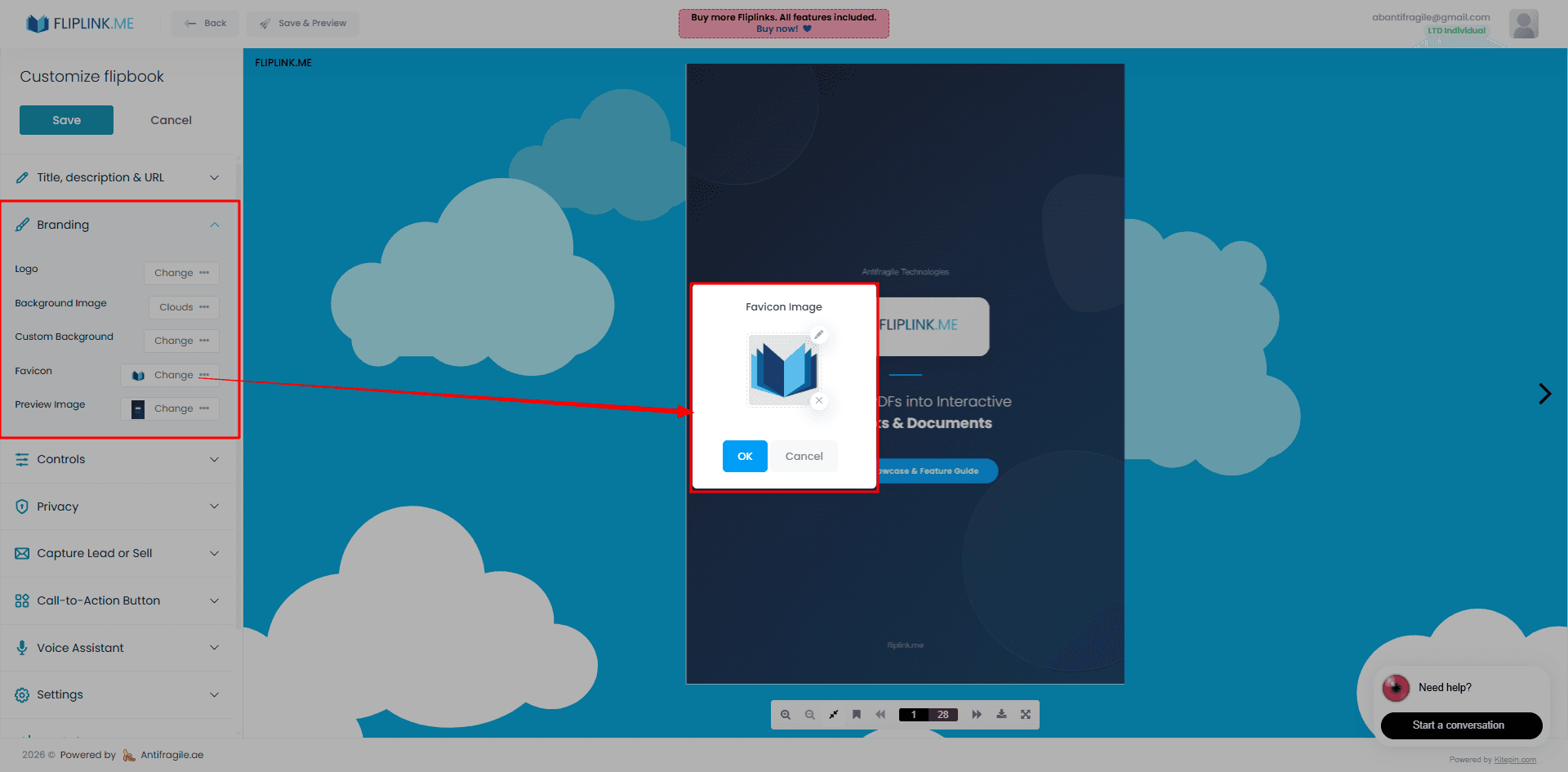
Every client has different brand guidelines — logos, color palettes, typography preferences, and tone. FlipLink's branding and design tools let you customize each publication to match.
Here's a practical workflow for managing multiple clients:
1. Create a Branding Template Per Client
Before uploading any PDFs, set up the visual identity for each client. This includes:
- Logo placement — Upload the client's logo to appear on the flipbook viewer toolbar
- Color scheme — Match the viewer background, toolbar, and accent colors to the client's brand palette
- Custom backgrounds — Use the client's brand patterns or imagery as the flipbook backdrop
- Toolbar configuration — Show or hide controls like download, print, and share based on client preferences
2. Apply Branding Consistently
Once you've configured a client's branding, every new publication for that client should follow the same template. This consistency is what makes the output feel professional rather than cobbled together.
3. Use Folders to Stay Organized
When you're managing publications for ten or twenty clients simultaneously, organization matters. Create a folder structure in your FlipLink dashboard that mirrors your client roster. Group each client's publications together so your team can find and update them quickly.
Custom Domains for Each Client
This is where white-label publishing gets truly seamless. Instead of sharing links like go.fliplink.me/your-publication, you can use custom domains so each client's publications live on their own branded URL.
For example:
catalogs.clientbrand.comfor a retail client's product catalogreports.anotherclient.comfor a financial services client's annual reportsdocs.youragency.comfor your agency's own portfolio
How to Set Up Client Domains
The process is straightforward:
- Add the domain in FlipLink's custom domain settings
- Configure DNS — The client (or you, if you manage their DNS) adds a CNAME record pointing to FlipLink
- Assign publications to that domain
There's no limit on how many custom domains you can add, which is critical for agencies. Whether you have five clients or fifty, each one can have their own branded URL without additional per-domain fees.
SSL and Trust
Every custom domain automatically gets SSL encryption, so publications load securely. This matters for client confidence — no browser warnings, no security concerns when sharing with their stakeholders.
Collaborating With Your Team
Agency work is inherently collaborative. Designers create the PDFs, account managers handle client communication, and project managers keep everything on track. FlipLink's team collaboration features support this workflow.
Set up your team so that:
- Designers can upload and preview publications before they go live
- Account managers can share publication links with clients and pull analytics
- Administrators can manage branding settings and custom domains
This division of responsibilities means no single person becomes a bottleneck. Your team can work in parallel across multiple client accounts.
Try FlipLink Free
Convert your PDF in seconds. No sign-up, no credit card — just upload and go.
Drop your PDF here or click to browse
Max 40MB
Paid plans from $39 raise this to 150 MB.
Sharing Analytics With Clients
Clients want to know their publications are being read. FlipLink tracks views, engagement time, and page-level analytics for every publication. As an agency, you can use this data to demonstrate ROI and justify ongoing retainers.
Building Client Reports
Pull the analytics data and include it in your regular client reporting. Key metrics to highlight:
- Total views — How many people opened the publication
- Average time spent — Whether readers are actually engaging or just clicking through
- Page-level heatmaps — Which sections get the most attention
- Device breakdown — Mobile vs. desktop reading patterns
These insights also help you advise clients on content strategy. If certain catalog pages get heavy traffic while others are ignored, that's actionable intelligence for the next edition.
Pricing Your Digital Publishing Services
One of the biggest questions agencies face is how to price this service. Here are three models that work well:
Per-Publication Pricing
Charge a flat fee for each flipbook you create and publish. This works well for one-off projects like event programs or annual reports. A typical range is $200–$800 per publication depending on complexity, design work, and the client's budget.
Monthly Retainer
For clients with ongoing publishing needs — regularly updated catalogs, monthly newsletters, quarterly reports — a retainer model makes more sense. Bundle the FlipLink hosting with your design services and charge a monthly fee that covers creation, updates, and analytics reporting.
Tiered Packages
Offer three tiers:
- Basic — PDF-to-flipbook conversion with standard branding
- Professional — Custom branding, custom domain, and monthly analytics
- Enterprise — Everything above plus ongoing content updates, A/B testing of layouts, and dedicated account management
The beauty of using FlipLink as your backend is the cost structure. At from $39 per lifetime code, your margins stay healthy regardless of which pricing model you choose. There are no monthly platform fees eating into your profit.
A Sample Client Onboarding Workflow
Putting it all together, here's what a typical agency workflow looks like:
- Discovery — Understand the client's publishing needs and brand guidelines
- Setup — Create a folder, configure branding, and set up their custom domain
- Production — Design the PDF, upload to FlipLink, apply branding, and preview
- Review — Share a preview link with the client for approval
- Launch — Publish to the custom domain and provide the final URL
- Report — Send monthly analytics showing engagement metrics
This process scales naturally. Once you've built the template and workflow for one client, onboarding the next takes a fraction of the time.
Common Agency Use Cases
Agencies across different verticals are using this approach:
- Real estate agencies publishing interactive property brochures for developers
- Marketing agencies creating digital catalogs for e-commerce brands
- Financial services firms distributing compliance-approved reports
- Event agencies producing interactive event guides and sponsor showcases
- Publishing houses offering digital magazine subscriptions
For deeper inspiration, check out our guide on how to white-label your flipbooks for step-by-step branding instructions.
Getting Started
The fastest path from reading this guide to delivering your first white-label publication is shorter than you might expect. Sign up, upload a client PDF, configure the branding, point a custom domain, and share the link — all in a single afternoon.
Create your free FlipLink account and start building your agency's digital publishing service today. Check our pricing page to see how the lifetime deal structure keeps your costs predictable as you scale.
Ready to Create Your First Flipbook?
Transform your PDFs into interactive flipbooks and documents. Get started with FlipLink's Lifetime Deal — lifetime access that starts at just $39.
Pay Once, Use Forever
10, 50 or 100 flipbooks · All 35 features · Unlimited domains
No feature gates. Every Lifetime Deal tier unlocks all 35 features.
- Every feature unlocked — no feature gates
- Stackable — buy more codes anytime
- Replaceable — swap old for new
- Unlimited custom domains (CNAME)
- No recurring fees, ever
Related Reading
How to White-Label Your Flipbooks for Client Delivery
Remove FlipLink branding and deliver flipbooks under your own brand. Perfect for agencies, freelancers, and enterprise teams.
Why Custom Domains Matter for Documents
Free subdomains work for side projects, but client-facing documents need branded URLs. Learn when and why a custom domain builds trust.
Best White-Label Flipbook Platforms for Agencies
Compare white-label flipbook platforms for agencies. Custom domains, branding removal, and client management features compared.