
Why Custom Domains Matter for Documents
Free subdomains work for side projects, but client-facing documents need branded URLs. Learn when and why a custom domain builds trust.

Published on March 14, 2026 · 6 min read
The Custom Domain Debate
A recent discussion on Reddit's r/webdev community asked a straightforward question: is a custom domain an absolute must when sharing professional content online? The post sparked over 100 comments, and the answers revealed something important about how people perceive URLs.
“A custom domain adds a certain degree of professionalism but it's not required.” — u/rcls0053 on r/webdev
That comment earned the most upvotes in the thread. And it captures the nuance perfectly — a custom domain is not technically required, but it communicates something about how seriously you take your work.
The original poster was sharing a developer portfolio. But the same question applies — arguably even more so — when you are sharing business documents with clients: sales proposals, product catalogs, real estate brochures, or training manuals.
When a Free Subdomain Is Perfectly Fine
Not every link needs a branded domain. Several commenters made valid points about when free subdomains work just fine.
“It's a portfolio, not a commercial website. What matters is the content. They can understand that you're broke, as you're searching for a job.” — u/sin_esthesia on r/webdev
Free subdomains are fine for internal team documents, personal projects, testing and prototyping, and early-stage startups that are still validating their idea. If your audience already knows and trusts you, the URL matters less than what is behind it.
When a Custom Domain Becomes Essential
The conversation shifts when money, trust, or first impressions are on the line. Consider these scenarios:
Sending a sales proposal to a prospect. You have one chance to make a strong impression. A link like yourcompany.com/proposal-acme signals that you are established and detail-oriented. A link like random-platform.app/doc/7f3a9b2 does the opposite.
Sharing a product catalog with distributors. Distributors evaluate whether they want to carry your products. Your catalog link is part of that evaluation — whether they realize it or not.
Publishing a digital magazine or report. If you are charging for access or building an audience, your domain is your brand. Readers remember insights.yourcompany.com, not a third-party subdomain.
Embedding a flipbook on your website. If the embedded content loads from a visibly different domain, it creates a subtle disconnect that erodes trust.
One commenter captured the power of using subdomains for organization:
“My portfolio lives on myname.com. My resume lives on resume.myname.com. My projects live on project.myname.com. Subdomains just look cool.” — u/sexytokeburgerz on r/webdev
That same approach works brilliantly for business documents — catalog.yourcompany.com, proposals.yourcompany.com, or menu.yourrestaurant.com.
What Your Document Link Says About Your Brand
URLs are part of your brand identity. Every time you share a link in an email, on social media, in a WhatsApp message, or on a printed QR code, the domain name is the first thing people see.
A branded URL communicates three things:
- Legitimacy — You own this domain. You are a real business, not a fly-by-night operation using free tools.
- Attention to detail — If you care enough to brand your document links, you probably care about the quality of what is inside.
- Permanence — A custom domain suggests the content will be there tomorrow. Free platform subdomains can disappear if you switch tools or if the platform shuts down.
This matters especially when your documents include lead capture forms. A visitor is far more likely to submit their name and email on resources.yourcompany.com than on a generic third-party URL.
Free: Share Pdf
Share your PDF across social media and messaging platforms.
Try it free — no sign-up neededHow to Set Up a Custom Domain for Your Documents
With FlipLink, adding a custom domain takes about five minutes:
- Choose your domain or subdomain. Something like
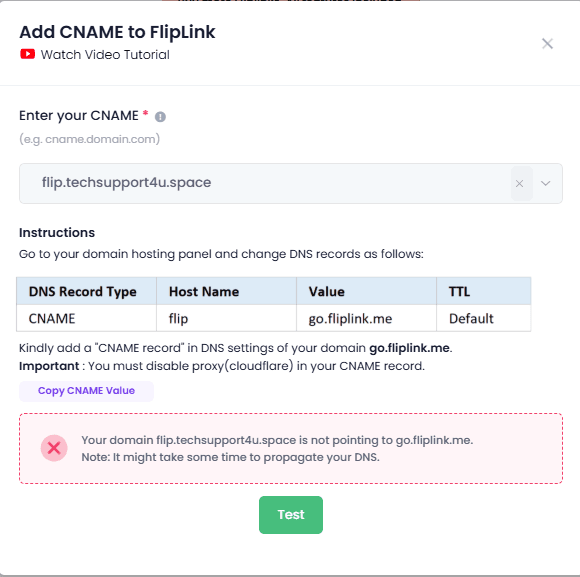
docs.yourcompany.comorcatalog.yourbrand.comworks well. - Add a CNAME record in your DNS settings pointing to FlipLink's servers.
- Verify the domain in your FlipLink dashboard. SSL is automatically provisioned — no extra steps or certificates to manage.
- Publish your flipbook or document. It is now live on your branded URL.
There is no limit on the number of custom domains you can add. You can have one for proposals, another for catalogs, and another for your restaurant menu — all at no additional cost.
Beyond the Domain: Full Branding Control
A custom domain is just the starting point. When a viewer opens your document, every visual element should reinforce your brand — not someone else's.
With FlipLink's branding and design options, you control the logo displayed in the viewer toolbar, the favicon in the browser tab, the background behind your document (choose from 30+ options or upload your own), the OG image that appears when your link is shared on social media, and the loading screen viewers see while the document loads.
Combined with white-label publishing, your viewers never see FlipLink branding at all. The experience is entirely yours — your domain, your logo, your colors. It looks like you built the entire viewer yourself.
This level of control matters when you are selling documents through Stripe-powered paywalls. Buyers need to trust the checkout experience, and a fully branded, custom-domain setup is what makes that possible.
The Real Question Is Not Whether — It Is When
The Reddit discussion was about developer portfolios, where the stakes are relatively low. But if you are sharing documents professionally — with clients, prospects, distributors, or paying readers — a custom domain is not a luxury. It is a baseline expectation.
The good news is that it does not have to be complicated or expensive. With FlipLink, you get unlimited custom domains with automatic SSL, complete white-label branding, and all the sharing and distribution tools you need — direct links, embed codes, QR codes, and social sharing — all under your own brand.
Start Branding Your Document Links
If you are still sharing professional content on generic subdomains, your documents are working harder than they need to. A branded URL removes friction, builds trust, and makes every shared link a reflection of your business.
Create your free FlipLink account and set up your first custom domain in minutes — or check our pricing to see what is included.
Ready to Create Your First Flipbook?
Transform your PDFs into interactive flipbooks and documents. Get started with FlipLink's Lifetime Deal — lifetime access that starts at just $39.
Pay Once, Use Forever
10, 50 or 100 flipbooks · All 35 features · Unlimited domains
No feature gates. Every Lifetime Deal tier unlocks all 35 features.
- Every feature unlocked — no feature gates
- Stackable — buy more codes anytime
- Replaceable — swap old for new
- Unlimited custom domains (CNAME)
- No recurring fees, ever
Related Reading
How to Set Up a Custom Domain for Your Flipbooks
Host your flipbooks on your own domain with CNAME setup. Step-by-step guide to configuring custom domains for a professional, branded experience.
How to White-Label Your Flipbooks for Client Delivery
Remove FlipLink branding and deliver flipbooks under your own brand. Perfect for agencies, freelancers, and enterprise teams.
Agency Guide to White-Label Publications
Learn how agencies can use FlipLink to deliver branded, white-label digital publications to clients with custom domains and branding.