
Privacy & Access Control
Control who can see your flipbook or document — set it as public, password-gated, or invite-only with email allowlist restrictions.
Overview
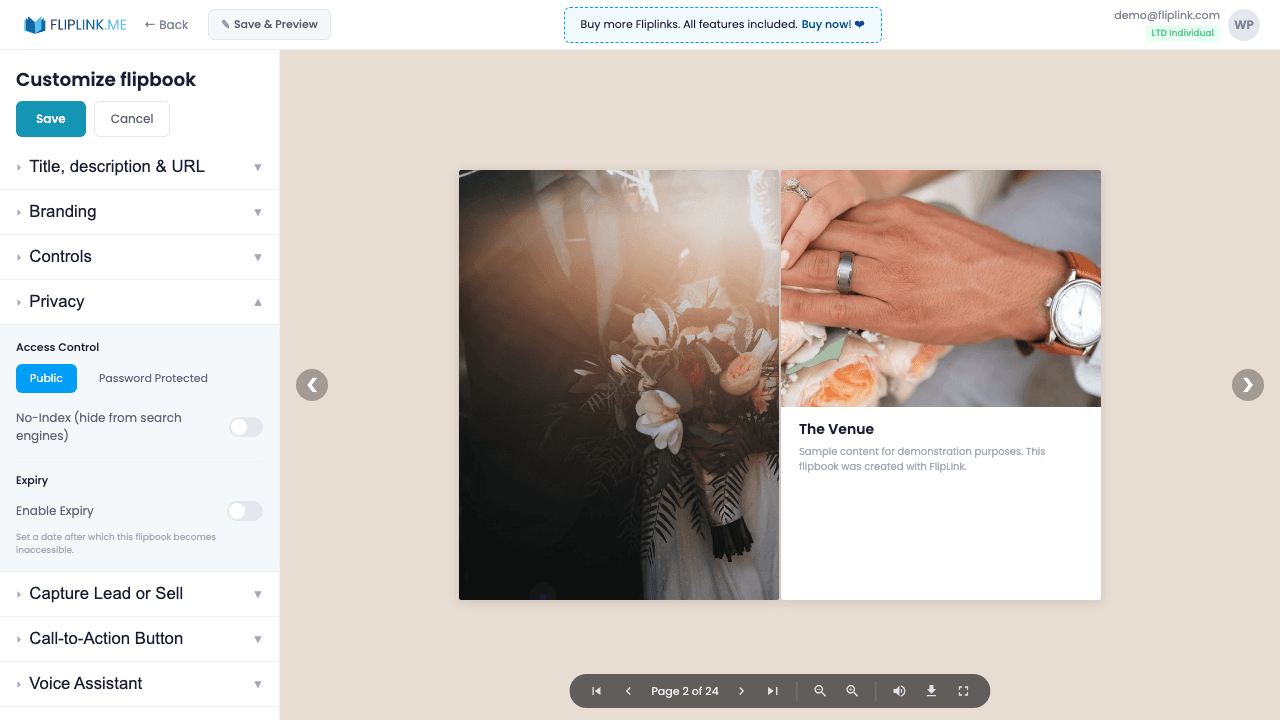
Control access granularly. Toggle between public and restricted access, enable NoIndex to prevent search engine indexing, set an email allowlist of up to 500 addresses, and use the publish/unpublish toggle for instant access control. Combine with password protection and link expiry for layered security.
What's Included
Public or restricted access
Toggle between public access (anyone with the link) and restricted mode that requires password, lead form, or email allowlist.
NoIndex for search engines
Prevent Google and other search engines from indexing specific publications. Keep sensitive content off search results.
Email allowlist (up to 500)
Restrict access to a curated list of up to 500 email addresses. Only approved viewers can submit the lead form and access content.
Published/unpublished toggle
Instantly make any publication accessible or inaccessible with a single toggle. Unpublished content returns a 'not available' page.
Free: Share Pdf
Share your PDF across social media and messaging platforms.
Try it free — no sign-up neededTry Privacy & Access Control Free
All features included in the free trial. No credit card required.
Related Features
Password Protection
Lock your flipbook or document behind a password so only authorized recipients can access your sensitive or premium content.
Link Expiry
Set links to expire after a date or number of views — ideal for time-sensitive proposals, limited-access content, and secure one-time document sharing.
Use Cases for Privacy & Access Control
Pay Once, Use Forever
10, 50 or 100 flipbooks · All 35 features · Unlimited domains
No feature gates. Every Lifetime Deal tier unlocks all 35 features.
- Every feature unlocked — no feature gates
- Stackable — buy more codes anytime
- Replaceable — swap old for new
- Unlimited custom domains (CNAME)
- No recurring fees, ever
Ready to Transform
Your PDFs?
Join thousands of businesses using FlipLink to create engaging, interactive content from their PDFs. Start free — no credit card required.