
Enregistrer comme modèle
Enregistre tes réglages d'image de marque, de capture de prospects et de confidentialité comme modèle réutilisable — applique-le instantanément chaque fois que tu crées un flipbook ou un document.
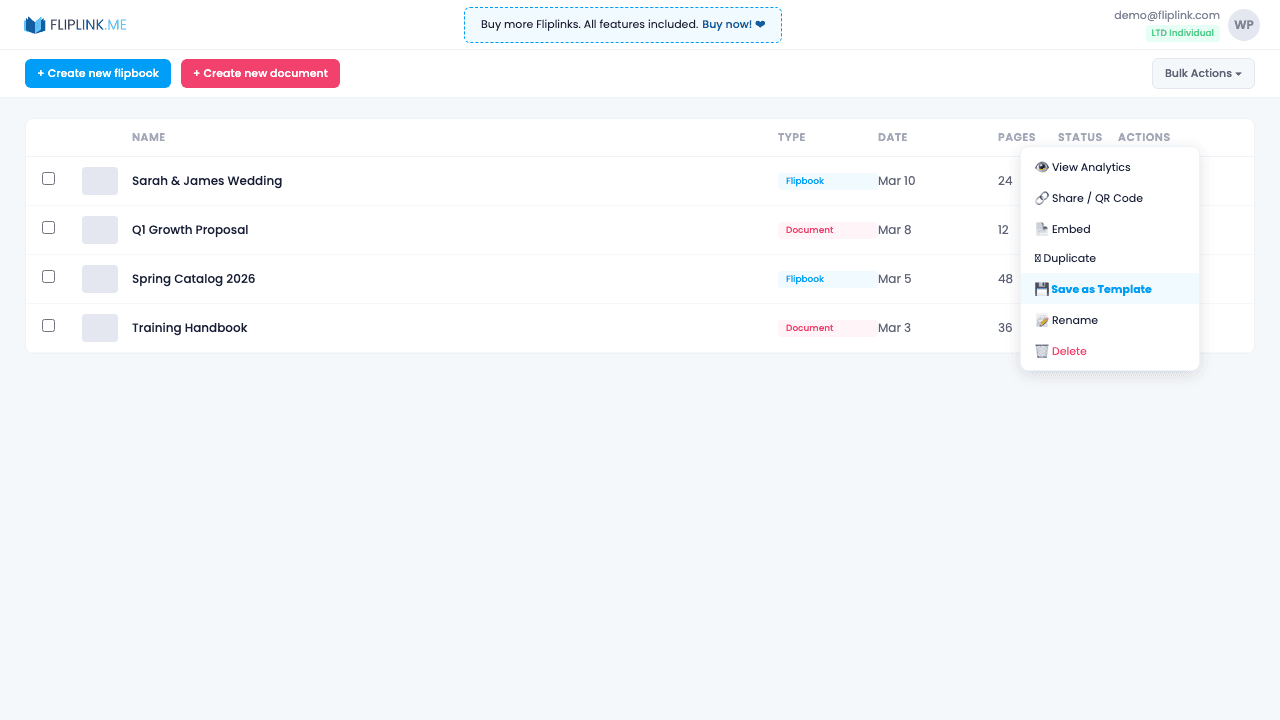
Aperçu
Marque n'importe quelle publication entièrement configurée comme modèle, puis sélectionne-la lors de la création d'un nouveau flipbook ou document. Tous les réglages sont hérités — image de marque, champs de capture de prospects, boutons d'appel à l'action, modèles d'e-mail, réglages de confidentialité et règles d'automatisation. Tes équipes préservent la cohérence de l'image de marque en partageant leurs modèles, et tu peux retirer le statut de modèle à tout moment sans affecter la publication d'origine.
Ce qui est inclus
Marquer comme modèle réutilisable
Transforme n'importe quelle publication entièrement configurée en modèle, en un clic depuis le menu d'actions. Elle reste également une publication active.
Sélection lors de la création
Au moment de créer un flipbook ou un document, choisis un modèle dans la liste déroulante pour démarrer avec tous les réglages déjà en place.
Héritage de tous les réglages
Les modèles reprennent l'image de marque, les champs de capture de prospects, les boutons d'appel à l'action, les modèles d'e-mail, les réglages de confidentialité et les règles d'automatisation.
Retrait du statut de modèle
Retire le statut de modèle à tout moment, sans affecter la publication d'origine ni les publications créées à partir d'elle.
Essaie Enregistrer comme modèle gratuitement
Toutes les fonctionnalités incluses dans l'essai gratuit. Sans carte bancaire.
Fonctionnalités associées
Créer des flipbooks
Transforme n'importe quel PDF en superbe flipbook 3D avec des animations de feuilletage réalistes, un rendu WebGL et un partage adapté au mobile, en quelques secondes.
Créer des documents
Partage tes PDF sous forme de documents en ligne défilables avec un lecteur épuré et professionnel propulsé par PDF.js — consultable, adapté à tous les écrans et personnalisable à ton image.
Remplacer le PDF
Mets à jour ton PDF sans perdre ton lien, tes réglages, tes statistiques ni tes prospects. Même URL, nouveau contenu — parfait pour les catalogues et les propositions commerciales.
Paie une fois, utilise pour toujours
10, 50 ou 100 flipbooks · Les 35 fonctionnalités · Domaines illimités
Aucun palier. Aucune restriction de fonctionnalité. Chaque code de l'offre à vie débloque tout.
- Chaque fonctionnalité débloquée — sans limites
- Cumulable — achète plus de codes quand tu veux
- Remplaçable — échange l'ancien contre le nouveau
- Domaines personnalisés illimités (CNAME)
- Aucuns frais récurrents, jamais
Prêt à transformer
tes PDF ?
Rejoins des milliers d'entreprises qui utilisent FlipLink pour créer du contenu interactif et engageant à partir de leurs PDF. Commence gratuitement — aucune carte bancaire requise.