
Expérience et mise en page
Contrôle l'apparence et le ressenti du contenu — choisis les modes de mise en page, l'épaisseur des pages, la prise en charge du texte RTL et une lecture par défilement ou par feuilletage pour chaque lecteur.
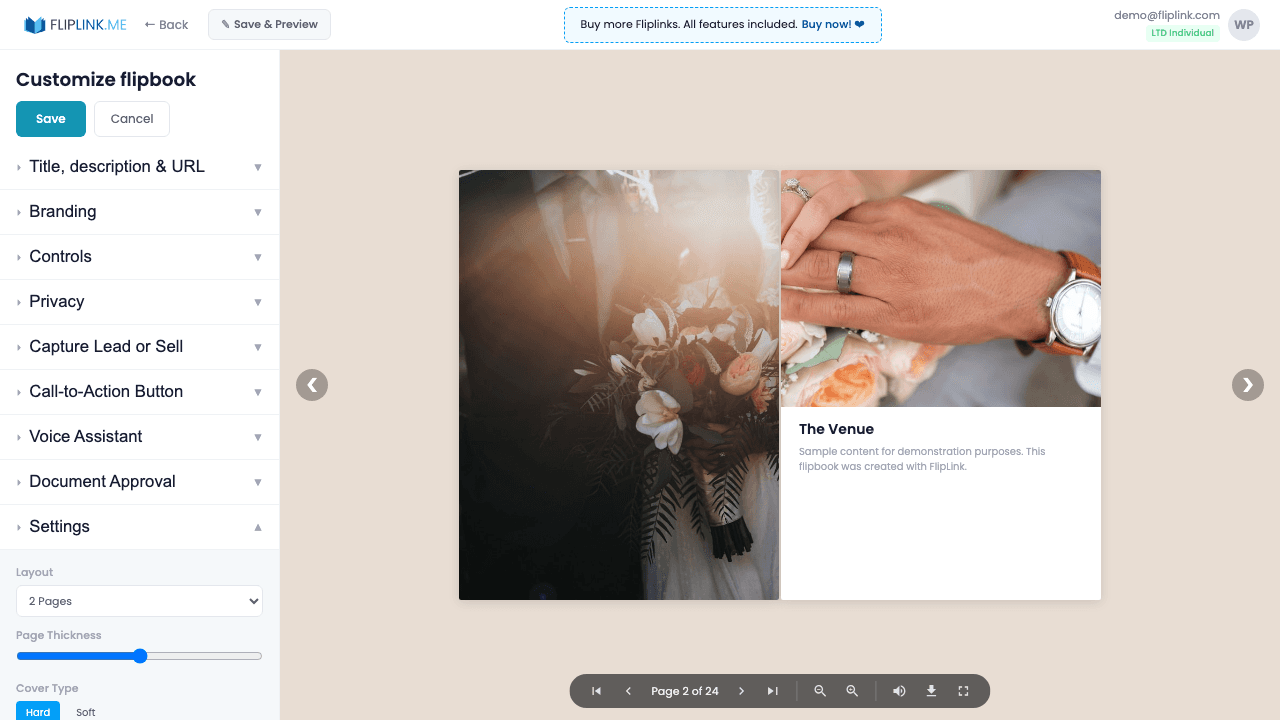
Aperçu
Contrôle l'expérience visuelle au-delà du contenu. Les flipbooks prennent en charge l'affichage en page unique, en double page, et une épaisseur de page configurable (plate, fine, normale, épaisse). Choisis entre une couverture souple et une couverture rigide. Les documents proposent le défilement vertical, la double page et le mode diapositive horizontal. Active le sens de lecture RTL pour tes contenus en arabe et en hébreu. Publie ou dépublie en un geste pour contrôler l'accès instantanément.
Démos en direct
Sens de lecture RTL
FlipbookÀ quoi prêter attention : Ce flipbook se lit de droite à gauche. Les pages se tournent dans le sens RTL, idéal pour les contenus en arabe, en hébreu ou en ourdou.
Pages épaisses + couverture rigide
FlipbookÀ quoi prêter attention : Remarque la profondeur 3D des pages — ce flipbook utilise des réglages de pages épaisses et une couverture rigide, ce qui donne un rendu plus réaliste, proche d'un vrai livre, au moment de tourner les pages.
Mode mise en page diapositive
DocumentÀ quoi prêter attention : Ce document utilise le mode diapositive horizontal plutôt que le défilement vertical par défaut. Les pages s'affichent une à une et se parcourent avec les flèches — idéal pour les présentations et les pitch decks.
Ce qui est inclus
Modes de mise en page (1 page, 2 pages, diapositive)
Les flipbooks proposent l'affichage en page unique et en double page. Les documents offrent le défilement vertical, la double page et le mode diapositive horizontal.
Options d'épaisseur des pages
Règle l'épaisseur des pages de ton flipbook, de plate à épaisse, pour un effet 3D plus réaliste et en accord avec le style de ton contenu.
Choix du type de couverture
Choisis entre une couverture souple et une couverture rigide, ce qui change l'aspect de la première et de la dernière page de ton flipbook.
Sens de lecture RTL
Active la lecture de droite à gauche pour l'arabe, l'hébreu et les autres langues RTL. Les pages se tournent automatiquement dans le bon sens.
Publication et dépublication
Contrôle l'accès à n'importe quelle publication en un instant. Un contenu dépublié affiche une page « indisponible » sans que rien ne soit supprimé.
Free: Pdf Viewer
Create an embeddable scrollable PDF viewer for your website.
Try it free — no sign-up neededEssaie Expérience et mise en page gratuitement
Toutes les fonctionnalités incluses dans l'essai gratuit. Sans carte bancaire.
Fonctionnalités associées
Créer des flipbooks
Transforme n'importe quel PDF en superbe flipbook 3D avec des animations de feuilletage réalistes, un rendu WebGL et un partage adapté au mobile, en quelques secondes.
Créer des documents
Partage tes PDF sous forme de documents en ligne défilables avec un lecteur épuré et professionnel propulsé par PDF.js — consultable, adapté à tous les écrans et personnalisable à ton image.
Remplacer le PDF
Mets à jour ton PDF sans perdre ton lien, tes réglages, tes statistiques ni tes prospects. Même URL, nouveau contenu — parfait pour les catalogues et les propositions commerciales.
Paie une fois, utilise pour toujours
10, 50 ou 100 flipbooks · Les 35 fonctionnalités · Domaines illimités
Aucun palier. Aucune restriction de fonctionnalité. Chaque code de l'offre à vie débloque tout.
- Chaque fonctionnalité débloquée — sans limites
- Cumulable — achète plus de codes quand tu veux
- Remplaçable — échange l'ancien contre le nouveau
- Domaines personnalisés illimités (CNAME)
- Aucuns frais récurrents, jamais
Prêt à transformer
tes PDF ?
Rejoins des milliers d'entreprises qui utilisent FlipLink pour créer du contenu interactif et engageant à partir de leurs PDF. Commence gratuitement — aucune carte bancaire requise.